
Monkey Saddle/Cylinder
Loading the math board and drawing, please wait…
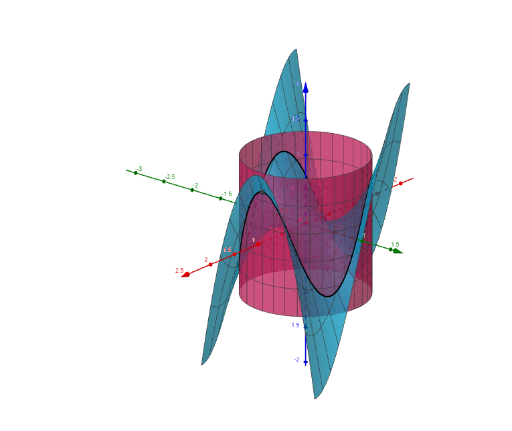
This example demonstrates the geometric construction of a monkey saddle and a cylinder. Key mathematical concepts include the geometric properties of a cylinder, vectors, and functions. Using GeoGebra commands such as UnitVector, Surface, and CurveCartesian, the dynamic properties of the cylinder's surface are illustrated. Suitable for high school mathematics education and learning.
GeoGebra Commands & Parameters
UnitVector(rp) → euSurface(u, v, u^(3) - ((3 * u) * v^(2)), u, -1, 1, v, -1, 1) → aSurface((R * cos(u)), ((R * kE) * sin(u)), v, u, 0, (2 * pi), v, -1, 1) → bCurveCartesian((R * cos(t)), ((R * kE) * sin(t)), (R^(3) * (cos(t))^(3)) - ((((3 * R^(3)) * kE^(2)) * cos(t)) * (sin(t))^(2)), t, 0, t1) → cCurveCartesian((R * cos(t)), ((R * kE) * sin(t)), (R^(3) * (cos(t))^(3)) - ((((3 * R^(3)) * kE^(2)) * cos(t)) * (sin(t))^(2)), t, 0, tE) → gVector(S, S1) → wVector(S, S1) → hVector(S, S2) → iVector(S, S3) → j
AI Drawing Prompt Reference
Draw a monkey saddle and a cylinder to illustrate the geometric properties of the cylinder, vectors, and functions. Start by creating a unit vector, then use it to generate a surface defined by a cubic function and a bivariate function as the monkey saddle. Next, construct a cylindrical surface using cosine and sine functions for its coordinates. Draw a curve representing the monkey saddle and its projection on the cylinder. Finally, add several vectors pointing from the cylindrical surface to different points to emphasize spatial relationships.
The prompt above was compiled from the original drawing commands and is for reference only.