
Visualizing the General Form of Quadratic Functions with Extremum
Loading the math board and drawing, please wait…
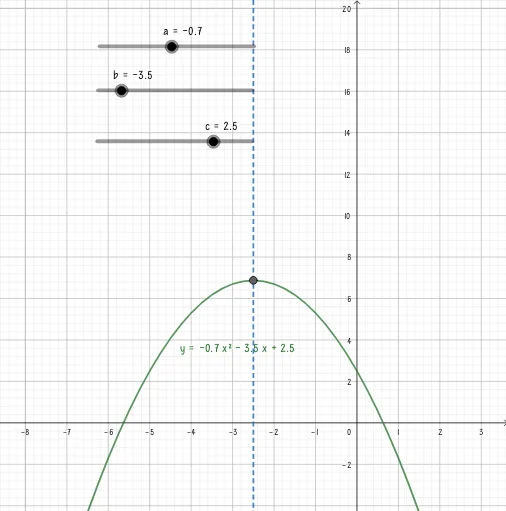
This example demonstrates how a quadratic function in its general form generates a parabola and how its extremum (the vertex, i.e., maximum or minimum point) can be located and visualized. It focuses on key ideas such as the general equation of a quadratic function, the geometric behavior of a parabola, the role of coefficients in determining opening direction and vertex position, and the meaning of extremum as the function’s largest or smallest value. Construction-wise, it leverages the GeoGebra command “Extremum” to compute and display the extremum based on the function expression and parameter objects, involving a, b, c for coefficients, f for the quadratic function, A for the extremum/vertex point, and eq1 for the corresponding equation or constraint. Designed for classroom instruction on functions and graphing, as well as for exploratory learning before formal calculus concepts.
GeoGebra Commands & Parameters
Extremum(f) → A
AI Drawing Prompt Reference
Draw a parabola representing a quadratic function in general form with three coefficients. Show how the leading coefficient determines the opening direction and how the coefficients affect the vertex position. Mark the extremum point (the highest or lowest point) on the curve with a clear symbol, and indicate its coordinates or the corresponding function value. The graph should clearly illustrate the parabola's shape, the extremum's location, and its relationship to the function's expression, suitable for classroom instruction or exploratory learning.
The prompt above was compiled from the original drawing commands and is for reference only.