
Constructing Quadratic Function Graphs (Quadratic Graphs 2)
Loading the math board and drawing, please wait…
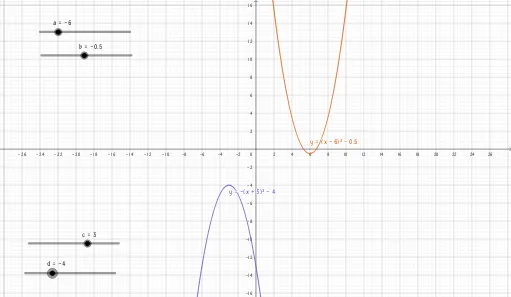
This GeoGebra example demonstrates how to construct and analyze quadratic-function graphs (parabolas) using multiple parameters and intermediate objects. It highlights the mapping from algebraic expressions to their geometric curve representation, helping learners see core properties of a quadratic curve through visual construction. Key mathematical concepts include quadratic functions, parabolic graphing, and the use of auxiliary variables/points to generate the final curve and related features. From the construction summary, the example involves objects labeled a, b, f, c, d, and g—indicating that several parameter-like quantities (a, b, c, d, g) and a function object (f) work together to drive the graph and its supporting structure. Suitable for middle and high school mathematics instruction on functions and graphing, as well as for classroom demonstration and guided student exploration of quadratic behavior.
GeoGebra Commands & Parameters
Numeric a(-6.0)Numeric b(-0.5)y = (x + a)^(2) + bNumeric c(3.0)Numeric d(-4.0)y = (-(x + c)^(2)) + d
AI Drawing Prompt Reference
Draw a quadratic function graph by adjusting parameters a and b to change the position and direction of the parabola. Then, use parameters c and d to draw another parabola opening downwards. First, set a to -6 and b to -0.5, resulting in y = (x + 6)² - 0.5. Next, set c to 3 and d to -4, resulting in y = -(x + 3)² - 4.
The prompt above was compiled from the original drawing commands and is for reference only.