
Visualizing the Definition of a Radian: From Circle to Angle
Loading the math board and drawing, please wait…
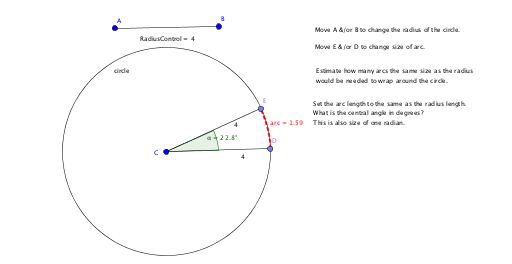
This GeoGebra example provides an interactive visualization of the definition of a radian: when the arc length equals the radius, the subtended central angle is exactly 1 radian. It uses a circle, a radius control point, an arc, and an angle measurement to make the abstract concept of radian measure tangible. Core mathematical concepts include radian measure, central angles, the ratio of arc length to radius, and the continuous variation of real numbers affecting the angle. The construction employs commands such as Segment to create the radius, Circle for the base circle, Point for the radius control, CircleArc to generate an arc equal in length to the radius, and Angle to measure the corresponding central angle, with text objects dynamically displaying values. This resource is ideal for high school or introductory college trigonometry students, helping them grasp the difference between radians and degrees and understand radians as a dimensionless ratio. It can be used for classroom demonstrations or self-directed exploration.
GeoGebra Commands & Parameters
Segment(A, B) → RadiusControlCircle(C, RadiusControl) → circlePoint(circle) → DSegment(C, D) → gPoint(circle) → ESegment(C, E) → hCircleArc(C, D, E) → arcAngle(D, C, E) → α