
Visualizing the Angle between a Line and a Plane
Loading the math board and drawing, please wait…
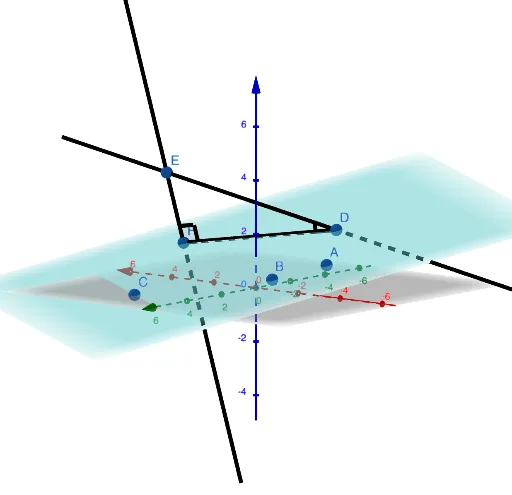
This example demonstrates the geometric representation of the angle between a line and a plane in three-dimensional space. Key math concepts include 3D vectors, plane equations, the perpendicular relationship between lines and planes, and angle measurement. Construction highlights involve using GeoGebra commands like Plane, PointIn, OrthogonalLine, Segment, Point, Line, and Angle to create the geometric elements and calculate the angle. Suitable for high school students and educators needing an intuitive understanding of solid geometry.
GeoGebra Commands & Parameters
Plane(A, B, C) → pPointIn(p) → DPointIn(p) → FOrthogonalLine(F, p) → gSegment(D, F) → hPoint(g) → ELine(E, D) → fAngle(D, F, E) → αAngle(E, D, F) → β
AI Drawing Prompt Reference
Visualize the angle between a line and a plane in 3D space by drawing a line and a plane, marking two points on the plane, and connecting them. Drop a perpendicular from one point to the plane, then connect another point on the line segment to the foot of the perpendicular. Measure the angles between the line segment and the perpendicular, and between the perpendicular and the other line, to represent the angle between the line and the plane.
The prompt above was compiled from the original drawing commands and is for reference only.