
Exploring SAS Congruent Triangles
Loading the math board and drawing, please wait…
In collections
Congruent Triangles
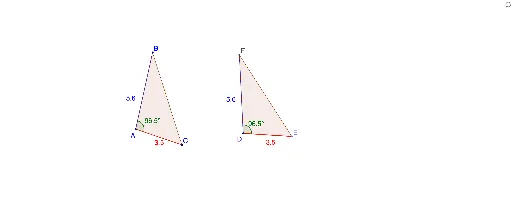
This example demonstrates constructing congruent triangles using the SAS (side-angle-side) condition. It involves core math concepts like triangle congruence criteria, geometric construction, and relationships between angles and sides. Key GeoGebra commands used include Circle, Segment, Point, Angle, Rotate, Line, Intersect, and Polygon for the construction. Suitable for middle school students and above to learn geometric proofs and construction techniques, or for educational demonstrations.
GeoGebra Commands & Parameters
Circle(A, B) → cCircle(A, C) → dSegment(B, A) → aSegment(C, A) → bSegment(C, B) → eCircle(D, b) → fCircle(D, a) → gPoint(f) → ESegment(D, E) → hAngle(C, A, B) → αRotate(E, α, D) → E'Angle(E, D, E') → βLine(D, E') → iIntersect(g, i, 2) → FSegment(D, F) → jSegment(F, E) → kPolygon(A, B, C) → poly1, c_1, a_1, b_1Polygon(D, F, E) → poly2, e_1, d_1, f_1
AI Drawing Prompt Reference
Draw a triangle ABC, then construct a congruent triangle DEF using the side-angle-side condition. First, draw sides AB and AC, then draw circles with center D and radii equal to AC and AB, find the intersection point E, rotate point E to make the angle equal to ∠BAC, get point E', draw line DE', find the intersection of DE' with the circle centered at D and radius DE, get point F, draw lines DF and EF to form triangle DEF.
The prompt above was compiled from the original drawing commands and is for reference only.