
Visualizing Sum of Integers: Symmetric Construction with Cubes and Spheres
Loading the math board and drawing, please wait…
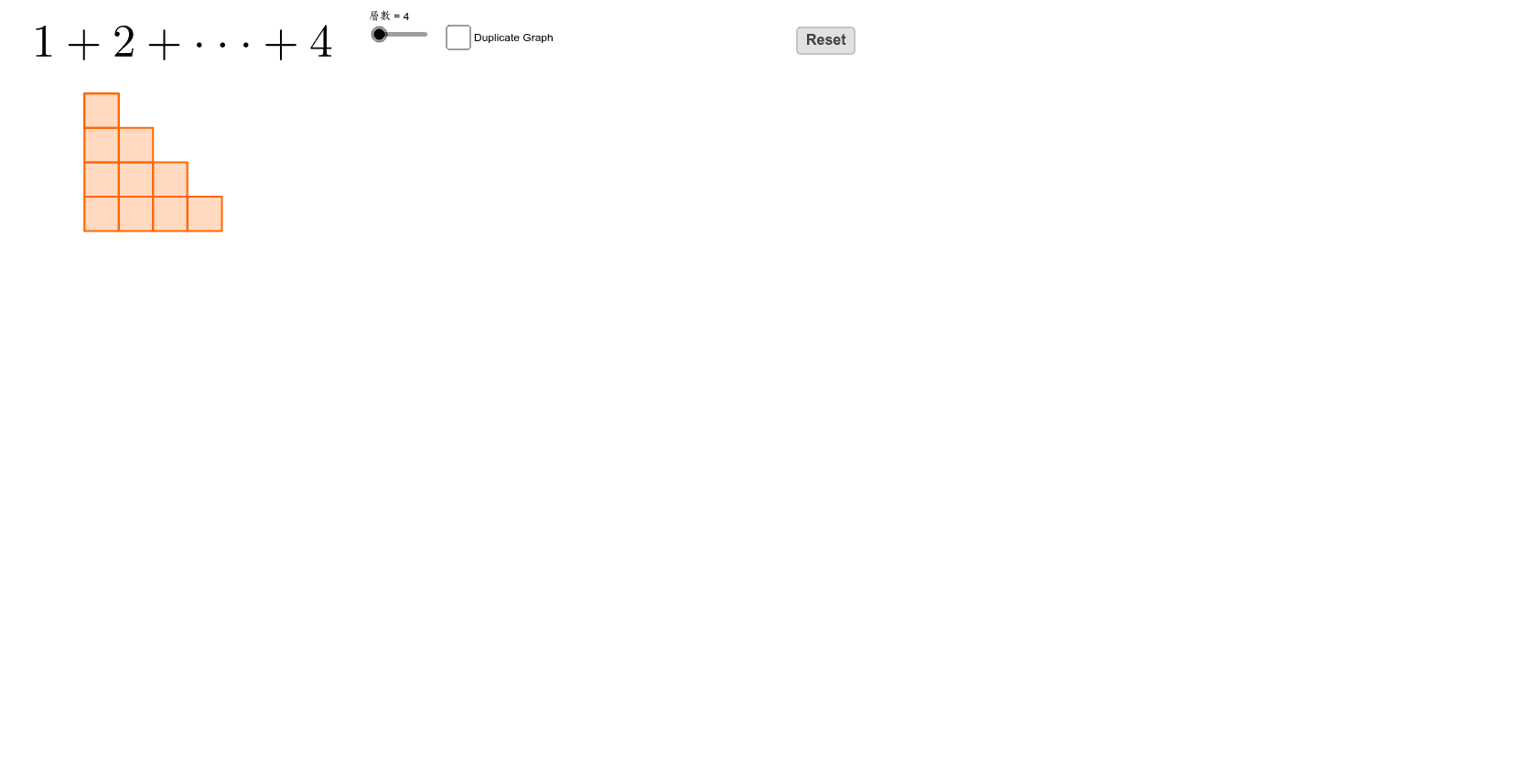
This GeoGebra example demonstrates the sum of integers (e.g., 1+2+3+...+n) through a three-dimensional geometric model, incorporating cubes, spheres, scalene triangles, and pie charts to transform abstract arithmetic series into a visual spatial structure. Core mathematical concepts include integer summation, symmetry, rotation, and geometric transformations. The construction uses GeoGebra commands such as Polygon, Vector, Sequence, Segment, and Rotate, building polygons, vector sequences, and rotated objects. Multiple lists (list_orange1 to list_orange10) organize different layers, and a slider (層數) controls the number of layers to dynamically illustrate the summation process. Suitable for middle and high school mathematics, this example helps students understand arithmetic series formulas and spatial symmetry, and can serve as a resource for math labs or inquiry-based learning.
GeoGebra Commands & Parameters
Polygon(A, B, 4) → poly1, f, g, h, i, C, DVector((0, 0), (1, 0)) → uVector((0, 0), (0, -1)) → vSequence(Translate[poly1, Vector[(k * v)]], k, 1, 層數 - 1) → list_{orange1}Sequence(Translate[poly1, Vector[(k * v) + u]], k, 1, 層數 - 1) → list_{orange2}Sequence(Translate[poly1, Vector[(k * v) + (2 * u)]], k, 2, 層數 - 1) → list_{orange3}Sequence(Translate[poly1, Vector[(k * v) + (3 * u)]], k, 3, 層數 - 1) → list_{orange4}Sequence(Translate[poly1, Vector[(k * v) + (4 * u)]], k, 4, 層數 - 1) → list_{orange5}Sequence(Translate[poly1, Vector[(k * v) + (5 * u)]], k, 5, 層數 - 1) → list_{orange6}Sequence(Translate[poly1, Vector[(k * v) + (6 * u)]], k, 6, 層數 - 1) → list_{orange7}Sequence(Translate[poly1, Vector[(k * v) + (7 * u)]], k, 7, 層數 - 1) → list_{orange8}Sequence(Translate[poly1, Vector[(k * v) + (8 * u)]], k, 8, 層數 - 1) → list_{orange9}Sequence(Translate[poly1, Vector[(k * v) + (9 * u)]], k, 9, 層數 - 1) → list_{orange10}Segment(E, F) → jSegment(G, H) → kSequence(Translate[poly1, Vector[((層數 + 1.5) * u) + (k * v)]], k, 1, 層數 - 1) → list_{blue2}Sequence(Translate[poly1, Vector[((層數 + 2.5) * u) + (k * v)]], k, 2, 層數 - 1) → list_{blue3}Sequence(Translate[poly1, Vector[((層數 + 3.5) * u) + (k * v)]], k, 3, 層數 - 1) → list_{blue4}Sequence(Translate[poly1, Vector[((層數 + 4.5) * u) + (k * v)]], k, 4, 層數 - 1) → list_{blue5}Sequence(Translate[poly1, Vector[((層數 + 5.5) * u) + (k * v)]], k, 5, 層數 - 1) → list_{blue6}Sequence(Translate[poly1, Vector[((層數 + 6.5) * u) + (k * v)]], k, 6, 層數 - 1) → list_{blue7}Sequence(Translate[poly1, Vector[((層數 + 7.5) * u) + (k * v)]], k, 7, 層數 - 1) → list_{blue8}Sequence(Translate[poly1, Vector[((層數 + 8.5) * u) + (k * v)]], k, 8, 層數 - 1) → list_{blue9}Sequence(Translate[poly1, Vector[((層數 + 9.5) * u) + (k * v)]], k, 9, 層數 - 1) → list_{blue10}Rotate(list_{blue2}, rotate, I) → Rotate_{b2}Rotate(list_{blue3}, rotate, I) → Rotate_{b3}Rotate(list_{blue4}, rotate, I) → Rotate_{b4}Rotate(list_{blue5}, rotate, I) → Rotate_{b5}Rotate(list_{blue6}, rotate, I) → Rotate_{b6}Rotate(list_{blue7}, rotate, I) → Rotate_{b7}Rotate(list_{blue8}, rotate, I) → Rotate_{b8}Rotate(list_{blue9}, rotate, I) → Rotate_{b9}Rotate(list_{blue10}, rotate, I) → Rotate_{b10}Sequence(Translate[poly1, Vector[((層數 + 0.5) * u) + (k * v)]], k, 0, 層數 - 1) → list_{blue1}
AI Drawing Prompt Reference
Create a 3D structure with multiple layers, where each layer consists of squares arranged through translation and rotation. The first layer has one square, the second layer has two squares, and so on, up to the specified number of layers. Squares in each layer are translated to the left and rotated downwards to form a symmetric pattern. Use squares of different colors to represent different layers, and then rotate some layers to create a more complex symmetric shape.
The prompt above was compiled from the original drawing commands and is for reference only.