
Visualizing Multiplication of Two Complex Numbers
Loading the math board and drawing, please wait…
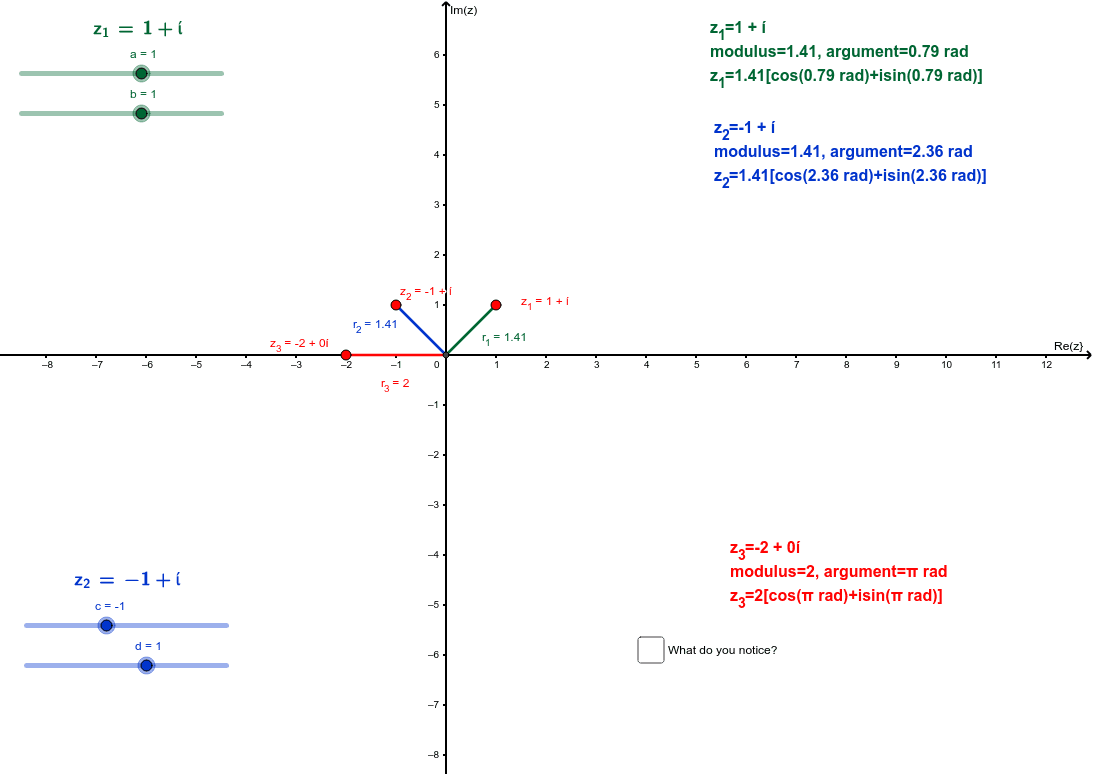
This GeoGebra example dynamically demonstrates the geometric meaning of multiplying two complex numbers: their magnitudes multiply and their arguments add. The core mathematical concepts include polar representation of complex numbers, the multiplication rule, geometric interpretation as rotation and scaling, and vector operations on the complex plane. Construction highlights: the Intersect command is used to create intersection points, Segment draws line segments representing complex vectors, and LaTeX displays formulas; objects include complex numbers z_1 and z_2 with their moduli r_1, r_2 and arguments α, β, and the product z_3 = z_1 × z_2 is constructed with its modulus r_3 and argument γ, making the result visually clear. Suitable for high school or early college students learning complex numbers, this interactive tool helps grasp the geometric intuition behind complex multiplication and serves as a classroom demonstration or self-study resource.
GeoGebra Commands & Parameters
Intersect(xAxis, yAxis) → ASegment(A, z_1) → r_1LaTeX(z_1, true, true) → text2Segment(A, z_2) → r_2LaTeX(z_2, true, true) → text3Segment(A, z_3) → r_3
AI Drawing Prompt Reference
Draw a complex plane with three vectors originating from the origin. The first two vectors represent two complex numbers, each labeled with its modulus and argument. The third vector represents their product, also labeled with modulus and argument. Use distinct colors for each vector. Display the algebraic expressions of the two complex numbers as text. Include sliders to adjust the real and imaginary parts of the two numbers, so that the product vector's modulus equals the product of the moduli and its argument equals the sum of the arguments.
The prompt above was compiled from the original drawing commands and is for reference only.