
Visualizing Derivatives Through Slope Function
Loading the math board and drawing, please wait…
In collections
学习 GeoGebra 经典应用
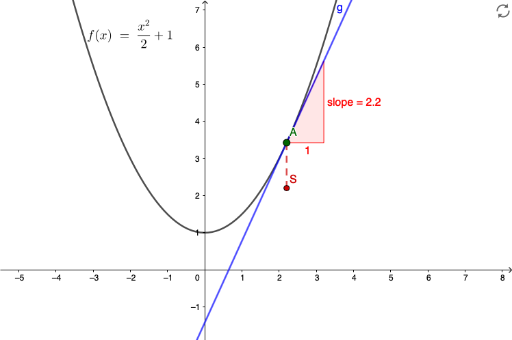
This GeoGebra example demonstrates how to visualize the concept of derivatives using dynamic slope functions. What it shows: The slope of the tangent line at a moving point A on a function curve changes dynamically, intuitively presenting the geometric meaning of derivatives. Mathematical concepts involved: Function tangents, instantaneous slope, derivative definition, and limit thinking. Construction: Use Point command to create a movable point A on function f, Tangent command to draw the tangent line at A, Slope command to calculate the tangent's slope, and Segment command to draw auxiliary lines showing the slope triangle. Control point A with sliders to observe slope changes. Target audience: High school or introductory calculus students, also suitable as a classroom demonstration tool for teachers teaching the geometric interpretation of derivatives.
GeoGebra Commands & Parameters
Point(f) → ATangent(A, f) → gSlope(g) → slopeSegment(S, A) → h
AI Drawing Prompt Reference
Draw a function graph with a movable point A, the tangent line at point A, the slope of the tangent line, and auxiliary lines showing the slope triangle. Control point A with sliders to observe the change of the tangent line's slope.
The prompt above was compiled from the original drawing commands and is for reference only.