
Visualizing Curved Surface Area of Cones
Loading the math board and drawing, please wait…
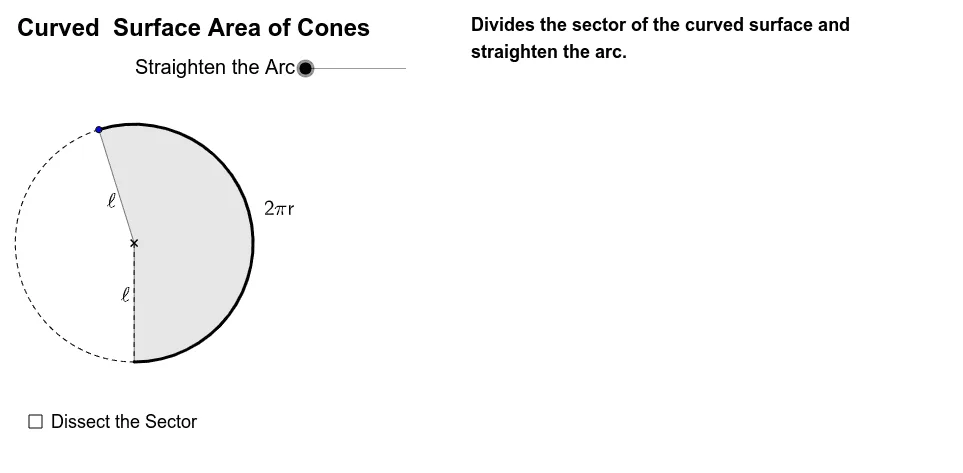
This GeoGebra example dynamically illustrates the geometric meaning and calculation of the curved (lateral) surface area of a cone. It demonstrates how the lateral surface unfolds into a sector of a circle, connecting the cone's slant height, base circumference, and central angle. Core mathematical concepts include sector area formula, surface area decomposition, and the relationship between the cone's dimensions and the sector's parameters. The construction uses GeoGebra commands such as Point, If, Sequence, Segment, Min, Max, CircleArc, Midpoint, CircleSector, and Circle, along with sliders (n, θ) to control the number of subdivisions and the angle, showing how the surface area changes. Suitable for high school or early college students learning solid geometry or introductory calculus, this interactive tool helps visualize the derivation of the lateral surface area formula and can be used for classroom demonstrations or self-study.
GeoGebra Commands & Parameters
Point(CircleArc[(0, 1), (1, 1), (0, 0)]) → AIf(y(A) > 0, Angle[(0, 0), (0, 1), A], 6.283185307179586) → αSequence((sin(i * θ), 1 - cos(i * θ)), i, 0, 2 * n) → list1Segment(E, (x(E) + 1, y(E))) → aPoint(a) → FMin(2 * (x(F) - x(E)), 1) → kMax(2 * (x(F) - x(E)) - 1, 0) → k'Sequence(If[k < 1, (x(O) + l * sin(i * φ) * cos(i * φ) / sin(φ), y(O) + l * sin(i * φ) * sin(i * φ) / sin(φ)), (x(O) + l * i, y(O))], i, 0, 2 * n) → list2Sequence(Sector[Rotate[Translate[Circle[(x(O) + 0, y(O) + 1), Element[list1, i]], Vector[Element[list1, i], Element[list2, i]]], -(2 * i - 1) * k * θ / 2, Element[list2, i]], Rotate[Translate[Element[list1, i], Vector[Element[list1, i], Element[list2, i]]], -(2 * i - 1) * k * θ / 2, Element[list2, i]], Rotate[Translate[Element[list1, i + 1], Vector[Element[list1, i], Element[list2, i]]], -(2 * i - 1) * k * θ / 2, Element[list2, i]]], i, 1, n) → list3Sequence(Sector[Rotate[Rotate[Translate[Circle[(x(O) + 0, y(O) + 1), Element[list1, i]], Vector[Element[list1, i], Element[list2, i]]], -(2 * i - 1) * k * θ / 2, Element[list2, i]], 180° * k', (x(O) + n * l - sin(θ / 2) / 2, y(O) + cos(θ / 2) / 2)], Rotate[Rotate[Translate[Element[list1, i], Vector[Element[list1, i], Element[list2, i]]], -(2 * i - 1) * k * θ / 2, Element[list2, i]], 180° * k', (x(O) + n * l - sin(θ / 2) / 2, y(O) + cos(θ / 2) / 2)], Rotate[Rotate[Translate[Element[list1, i + 1], Vector[Element[list1, i], Element[list2, i]]], -(2 * i - 1) * k * θ / 2, Element[list2, i]], 180° * k', (x(O) + n * l - sin(θ / 2) / 2, y(O) + cos(θ / 2) / 2)]], i, n + 1, 2 * n) → list4If(y(A) > 0, CircleArc[(0, 1), (0, 0), A], 6.283185307179586) → sCircleArc((0, 1 / (1 - m)), O, L) → bSegment((0, 0), (s, 0)) → dMidpoint(d) → B'CircleArc((0, 1), A, (0, 0)) → cMidpoint(a) → CPoint(Segment[(0, 1), (s, 1)]) → DSegment(D, (x(D), y(D) - 1)) → eMidpoint(e) → GCircleSector((0, 1), (0, 0), A) → fCircle((0, 1), 1) → gMidpoint(A, D) → H
AI Drawing Prompt Reference
Visualize the lateral surface of a cone unfolding into a sector of a circle. Show the cone's slant height, base circumference, and the sector's central angle, highlighting their relationships. Use sliders to adjust the number of subdivisions and the angle of the sector, demonstrating how the surface area changes. Include the cone, the unrolled sector, the base circle, and relevant measurements like lengths and angles.
The prompt above was compiled from the original drawing commands and is for reference only.