
Visualizing Bin Packing Algorithms
Loading the math board and drawing, please wait…
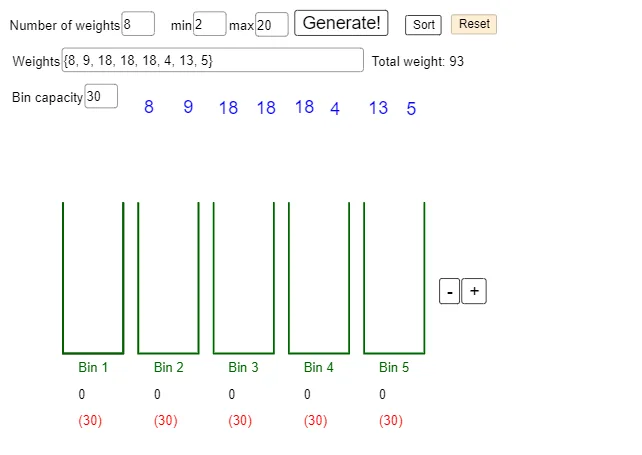
This GeoGebra example visualizes the Bin Packing problem by demonstrating how a set of items (with weights) can be packed into multiple bins under capacity constraints, so that the number of bins used and/or packing efficiency can be compared across strategies. It highlights optimization concepts such as capacity-limited placement, iterative assignment, and organizing a weight set into bins, all shown through geometry-based representations of bins and loaded regions. Construction-wise, it uses Sequence, PolyLine, Textfield, and Mod to generate the weight/iteration sequence, draw boundaries/lines, label key quantities, and implement cyclic indexing for distribution. Objects such as wtMax, wtMin, MaxWeights, T1–T20, numWeights, binW, binH, binCap, binSep, MaxBins, and numBins define the item weight ranges, bin geometry, and capacity/bin counts, while Quads (and related labeled geometry variables) render each bin and its contents. Suitable for high school to early university use in optimization, discrete math, and algorithm visualization.
GeoGebra Commands & Parameters
Sequence(Random[wtMin, wtMax], t, 1, MaxWeights) → WPolyLine(A, B, C, D) → iSequence(Polygon[A + (t, 0), B + (t, 0), C + (t, 0), D + (t, 0)], t, 0, numBins - 1) → QuadsTextfield(binCap) → InputBox1Textfield(Wcur) → InputBox2Sequence(Text["Bin " + (t), B + (t - 1 + 0.2, -0.25)], t, 1, numBins) → txtbinlabelsSequence(PolyLine[A + (t, 0), B + (t, 0), C + (t, 0), D + (t, 0)], t, 0, numBins - 1) → BinsSequence(Sum[Sequence[If[IsInRegion[T(i), Quads(t)], Wcur(i), 0], i, 1, numWeights]], t, 1, numBins) → BinSumsSequence(Text["(" + (binCap - BinSums(t)) + ")", B + (t - 1 + 0.2, -0.95)], t, 1, numBins) → txtbinremainTextfield(numWeights) → InputBox3Textfield(wtMin) → InputBox4Textfield(wtMax) → InputBox5Sequence(Text["" + (BinSums(t)), B + (t - 1 + 0.2, -0.6)], t, 1, numBins) → txtbinsumsMod(11.2, 5) → a
AI Drawing Prompt Reference
Create a visualization of the Bin Packing problem optimization algorithm. The graphic features multiple bins with limited capacity, each represented by a geometric shape, with internal colors or fills indicating the weights of items placed inside. Sliders and text labels show the current weight in each bin and the remaining capacity, as well as the total weight of items and the number of bins. Item weights are randomly generated and arranged in a sequence, with bins placed horizontally at equal intervals. The graphic should illustrate how items are distributed among the bins and how strategies can optimize the number of bins used and packing efficiency.
The prompt above was compiled from the original drawing commands and is for reference only.