
Visualizing Addition and Subtraction of Negative Numbers on a Number Line by azb
Loading the math board and drawing, please wait…
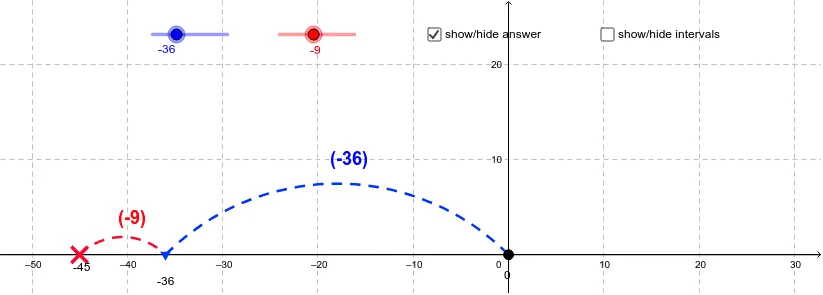
① This GeoGebra example demonstrates how to add and subtract negative numbers using a dynamic number line, making the abstract rules of sign operations visually intuitive. ② Core mathematical concepts include negative number arithmetic, number line direction and distance, additive inverses, and sign determination of results. ③ Construction highlights: uses commands such as CircleArc, Line, Mirror, Arc, and Sequence to build the number line and directional arrows; objects like A, B, C, D, E mark key points, while text objects display the operation and result, and lists (list1, list2) control step-by-step animation. ④ Suitable for middle school mathematics lessons on negative numbers, also useful for elementary enrichment or high school review, as an interactive classroom demonstration or self-study tool.
GeoGebra Commands & Parameters
CircleArc(D, B, A) → cCircleArc(E, C, B) → dLine(A, B) → eMirror(D, e) → D'Mirror(B, e) → B'_1Mirror(A, e) → A'Arc(Mirror[Circle[D, B], e], B'_1, A') → c'Mirror(E, e) → E'Mirror(C, e) → C'Mirror(B, e) → B'Arc(Mirror[Circle[E, C], e], C', B') → d'Sequence((x(A) + (j * intervalsize), y(A)), j, 1, 60) → list1Sequence((x(A) - (j * intervalsize), y(A)), j, 1, 60) → list2
AI Drawing Prompt Reference
Draw a number line from left to right representing negative and positive numbers. Mark points A, B, C, D, and E on the line to represent negative and positive values. Use arrows to indicate the direction of the number line. Demonstrate addition and subtraction of negative numbers by moving points A and B, and observe the changes in the result on the number line. Use arcs and mirroring operations to show the inverse operations of addition and subtraction. Create two lists to represent 60 points moving right and left from point A, for animation demonstration.
The prompt above was compiled from the original drawing commands and is for reference only.