
Consecutive Triangle Numbers Form a Square
Loading the math board and drawing, please wait…
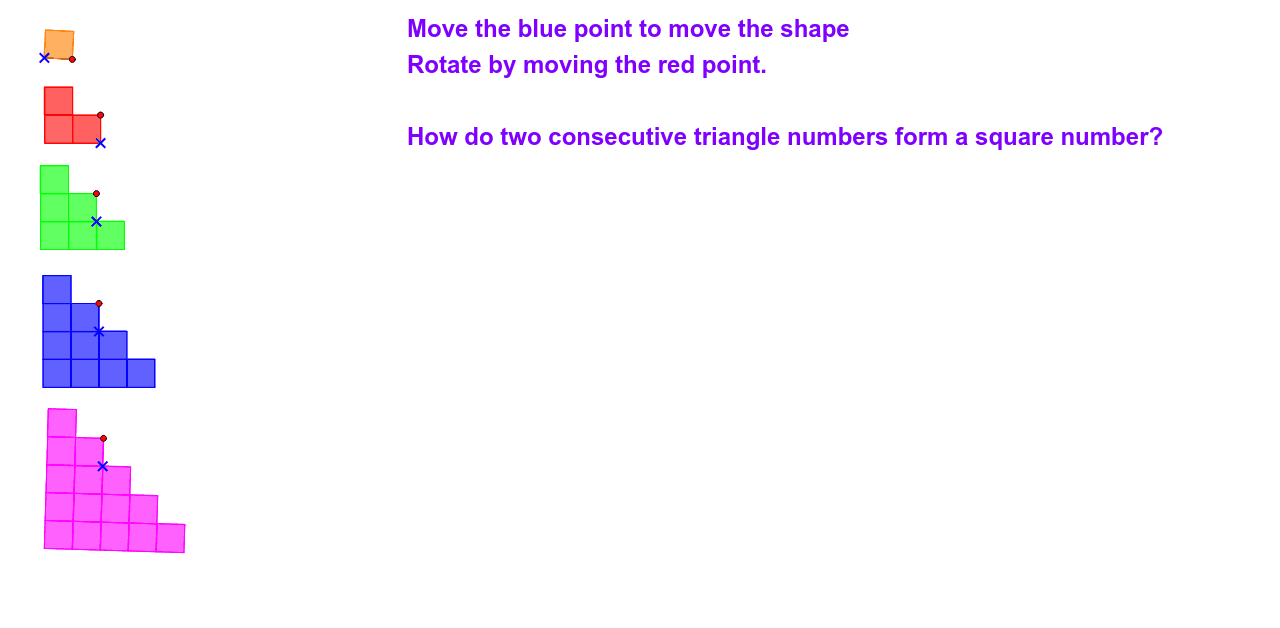
① This GeoGebra example dynamically demonstrates that the sum of two consecutive triangular numbers always equals a square number, by allowing users to move triangular dot patterns. ② The core mathematical concept is the relationship between triangular numbers (T_n = n(n+1)/2) and square numbers, specifically T_n + T_{n+1} = (n+1)^2, illustrating a beautiful number-theoretic identity through visual geometry. ③ Construction details: The applet uses GeoGebra commands such as Point, Segment, and Polygon to create multiple triangular arrays (e.g., poly1, poly1_1, poly2, poly3) with many points and segments. Users can drag points (like B, C, D, E) or use sliders to move the triangles, observing how two consecutive triangular numbers fit together to form a square. ④ This resource is suitable for middle or high school students learning about sequences, figurate numbers, or algebraic identities, and is ideal for exploratory activities in mathematics classrooms to foster visual and conceptual understanding.
GeoGebra Commands & Parameters
Point(Circle[B, 1]) → CSegment(B, C) → aPolygon(B, C, 4) → poly1, b, c, d, e, D, EPoint(Circle[B_1, 1]) → C_1Segment(B_1, C_1) → a_1Polygon(B_1, C_1, 4) → poly1_1, b_1, c_1, d_1, e_1, D_1, E_1Polygon(E_1, D_1, 4) → poly2, f, g, h, i, F, GPolygon(F, D_1, 4) → poly3, j, k, l, m, H, IPoint(Circle[B_2, 1]) → C_2Segment(B_2, C_2) → a_2Polygon(B_2, C_2, 4) → poly1_2, b_2, c_2, d_2, e_2, D_2, E_2Polygon(E_2, D_2, 4) → poly2_1, f_1, g_1, h_1, i_1, F_1, G_1Polygon(F_1, D_2, 4) → poly3_1, j_1, k_1, l_1, m_1, H_1, I_1Polygon(E_2, G_1, 4) → poly4, n, p, q, r, J, KPolygon(B_2, E_2, 4) → poly5, s, t, n_1, p_1, L, MPolygon(B_2, M, 4) → poly6, q_1, r_1, s_1, t_1, N, OPoint(Circle[B_3, 1]) → C_3Segment(B_3, C_3) → a_3Polygon(B_3, C_3, 4) → poly1_3, b_3, c_3, d_3, e_3, D_3, E_3Polygon(E_3, D_3, 4) → poly2_2, f_2, g_2, h_2, i_2, F_2, G_2Polygon(F_2, D_3, 4) → poly3_2, j_2, k_2, l_2, m_2, H_2, I_2Polygon(E_3, G_2, 4) → poly4_1, n_2, p_2, q_2, r_2, J_1, K_1Polygon(B_3, E_3, 4) → poly5_1, s_2, t_2, n_3, p_3, L_1, M_1Polygon(B_3, M_1, 4) → poly6_1, q_3, r_3, s_3, t_3, N_1, O_1Polygon(N_1, M_1, 4) → poly7, f_3, g_3, h_3, i_3, P, QPolygon(M_1, K_1, 4) → poly8, j_3, k_3, l_3, m_3, R, SPolygon(K_1, J_1, 4) → poly9, a_4, b_4, c_4, d_4, T, UPolygon(N_1, Q, 4) → poly10, e_4, f_4, g_4, h_4, V, WPoint(Circle[B_4, 1]) → C_4Segment(B_4, C_4) → a_5Polygon(B_4, C_4, 4) → poly1_4, b_5, c_5, d_5, e_5, D_4, E_4Polygon(E_4, D_4, 4) → poly2_3, f_5, g_5, h_5, i_4, F_3, G_3Polygon(F_3, D_4, 4) → poly3_3, j_4, k_4, l_4, m_4, H_3, I_3Polygon(E_4, G_3, 4) → poly4_2, n_4, p_4, q_4, r_4, J_2, K_2Polygon(B_4, E_4, 4) → poly5_2, s_4, t_4, n_5, p_5, L_2, M_2Polygon(B_4, M_2, 4) → poly6_2, q_5, r_5, s_5, t_5, N_2, O_2Polygon(N_2, M_2, 4) → poly7_1, f_6, g_6, h_6, i_5, P_1, Q_1Polygon(M_2, K_2, 4) → poly8_1, j_5, k_5, l_5, m_5, R_1, S_1Polygon(K_2, J_2, 4) → poly9_1, a_6, b_6, c_6, d_6, T_1, U_1Polygon(N_2, Q_1, 4) → poly10_1, e_6, f_7, g_7, h_7, V_1, W_1Polygon(V_1, Q_1, 4) → poly11, i_6, j_6, k_6, l_6, Z, A_1Polygon(Q_1, P_1, 4) → poly12, m_6, n_6, p_6, q_6, Z_1, A_2Polygon(P_1, R_1, 4) → poly13, r_6, s_6, t_6, a_7, P_2, Q_2Polygon(R_1, T_1, 4) → poly14, b_7, c_7, d_7, e_7, R_2, S_2Polygon(V_1, A_1, 4) → poly15, i_7, j_7, k_7, l_7, T_2, U_2
AI Drawing Prompt Reference
Create a dynamic geometric figure composed of multiple square grids, demonstrating that the sum of two consecutive triangular numbers equals a square number. The figure consists of several nested layers of squares, each layer containing multiple small squares, arranged in a stepped pattern. Users can drag control points or use sliders to adjust the positions of layers, observing how two triangular arrays fit together to form a complete large square. Use distinct colors for different square regions and maintain neat dot arrangements to visually illustrate the number-theoretic identity.
The prompt above was compiled from the original drawing commands and is for reference only.