
Visualizing Addition and Multiplication of Complex Numbers
Loading the math board and drawing, please wait…
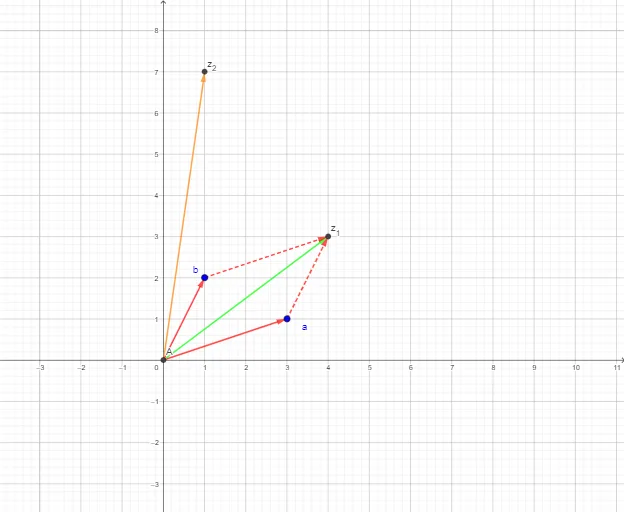
This GeoGebra example dynamically illustrates the geometric meaning of addition and multiplication of complex numbers. It represents complex numbers as vectors in the complex plane, showing how vector addition and rotation-scaling correspond to complex arithmetic. Core concepts include complex numbers, the complex plane, vector operations, and the modulus-argument interpretation of multiplication. Construction uses the Intersect command to find intersection points and the Vector command to create vectors, involving objects a, b, z_1, z_2, A, u, v, w, c, d, e. Suitable for high school or early college students learning complex numbers, this interactive tool helps build intuition for complex operations and serves as an effective classroom demonstration.
GeoGebra Commands & Parameters
Intersect(xAxis, yAxis) → AVector(A, a) → uVector(A, b) → vVector(A, z_1) → wVector(A, z_2) → cVector(a, z_1) → dVector(b, z_1) → e
AI Drawing Prompt Reference
Create a dynamic diagram on the complex plane illustrating the geometric meaning of complex number addition and multiplication. Represent two complex numbers as vectors from the origin, with sliders to adjust their real and imaginary parts. Use distinct colors or styles for the two complex vectors, their sum vector, and their product vector. Show the geometric construction of addition via vector parallelogram, and multiplication via rotation and scaling. Include coordinate axes, intersection points, and vectors from the origin to each complex point, with clear labels for the corresponding complex expressions. The layout should be intuitive for observing the geometric transformations of complex operations.
The prompt above was compiled from the original drawing commands and is for reference only.