
Venn Diagrams: Logic with Two Sets
Loading the math board and drawing, please wait…
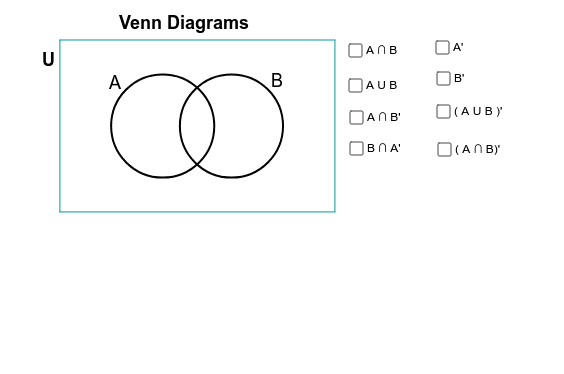
① This example demonstrates the logical relationships between two sets using a Venn diagram composed of two intersecting circles. ② Core mathematical concepts include set theory operations (intersection, union, complement) and logical reasoning, along with planar geometry of circle intersections and region partitioning. ③ Construction highlights: using GeoGebra commands such as Point, Circle, Intersect to create the circles and their intersection points, CircleArc and CircumcircleArc to build the arcs, Polygon to form closed regions representing different set areas, and text objects to label the regions. ④ Suitable for middle school or introductory logic courses, helping students visualize set operations and their correspondence to Venn diagrams, and also useful for demonstrating Boolean logic in computer science.
GeoGebra Commands & Parameters
Point(xAxis) → ECircle(E, 3) → ePoint(xAxis) → FCircle(F, 3) → fIntersect(e, f) → G, H, ,CircleArc(F, G, H) → gCircleArc(E, H, G) → hCircle(F, 3) → kCircle(E, 3) → pPoint(e) → APoint(f) → RCircumcircleArc(G, A, H) → sCircleArc(F, G, H) → tCircumcircleArc(G, R, H) → e_1CircleArc(E, H, G) → f_1Polygon(I, L, K, J) → poly4, i_1, l_1, k_1, j_1Circle(F, 2.95) → g_1Circle(E, 2.95) → h_1CircleArc(F, G, H) → q_1CircleArc(E, H, G) → r_1
AI Drawing Prompt Reference
Draw two intersecting circles to represent two sets. Start by creating two points E and F on the x-axis and drawing two circles e and f with radius 3 centered at E and F, respectively. Find the intersection points G and H of these circles, and draw arcs g and h with G and H as centers and F and E as centers. Then draw arcs k and p of circles f and e. Use points A and H, along with intersection points G of circles F and E, to draw arcs s and e_1. Use points R and H, along with intersection points G of circles F and E, to draw arc f_1. Finally, use intersection points G, A, H, and R, along with arcs s, e_1, and f_1, to draw a quadrilateral region poly4.
The prompt above was compiled from the original drawing commands and is for reference only.