
Venn Diagram Set Operations Demo by loreang98
Loading the math board and drawing, please wait…
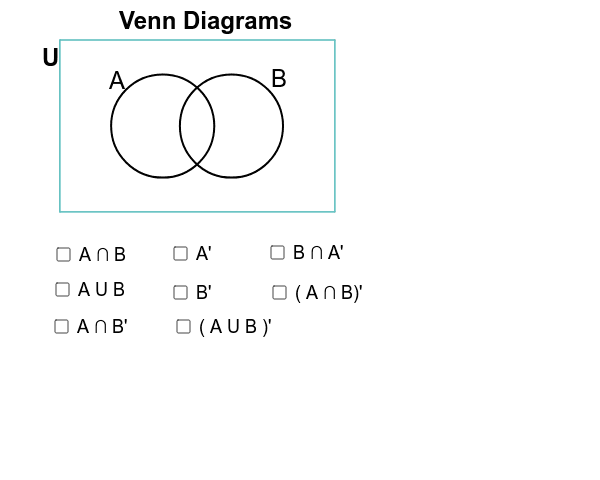
This GeoGebra example demonstrates how to create Venn Diagrams to visually represent relationships between two or more sets, including intersection, union, and complement operations. Key mathematical concepts covered: set theory fundamentals, logical operations, and geometric representation of abstract concepts. Construction details: Uses Circle command to draw circles representing sets, Intersect command to find intersection points, Polygon command to visualize overlap regions, and Point command to mark key elements. Ideal for secondary school mathematics courses on sets and logic, as well as introductory probability and statistics lessons teaching the inclusion-exclusion principle. Teachers can dynamically demonstrate abstract set operations to develop students' mathematical thinking abilities.
GeoGebra Commands & Parameters
Point(xAxis) → ECircle(E, 3) → ePoint(xAxis) → FCircle(F, 3) → fIntersect(e, f) → G, H, ,CircleArc(F, G, H) → gCircleArc(E, H, G) → hCircle(F, 3) → kCircle(E, 3) → pPoint(e) → APoint(f) → RCircumcircleArc(G, A, H) → sCircleArc(F, G, H) → tCircumcircleArc(G, R, H) → e_1CircleArc(E, H, G) → f_1Polygon(I, L, K, J) → poly4, i_1, l_1, k_1, j_1Circle(F, 2.95) → g_1Circle(E, 2.95) → h_1CircleArc(F, G, H) → q_1CircleArc(E, H, G) → r_1
AI Drawing Prompt Reference
Draw two intersecting circles to represent two sets, with one center on the x-axis and radius 3, and the other also with a center on the x-axis and radius 3. Use the intersect command to find the points of intersection, then draw arcs between these points to represent the intersection of the sets. Next, use the polygon command to draw the intersection region. Finally, draw arcs outside each circle to represent the complement of the sets.
The prompt above was compiled from the original drawing commands and is for reference only.