
Vectors and Projectiles 1.1
Loading the math board and drawing, please wait…
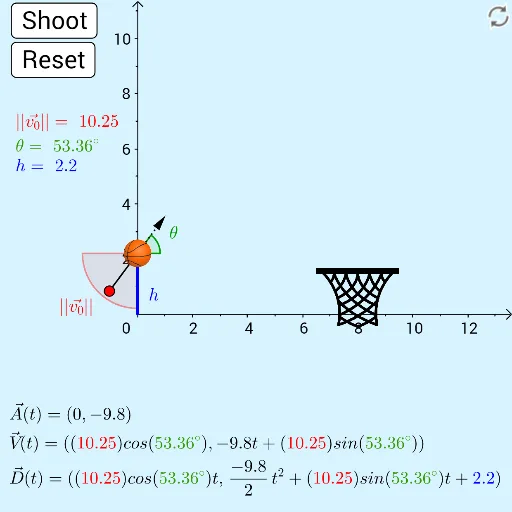
This example demonstrates the basic concepts of vectors and projectiles. Key mathematical concepts include vectors, angles, and trigonometric functions. Using GeoGebra commands such as Vector, Angle, and CurveCartesian, the trajectory of a projectile is dynamically displayed. Suitable for high school physics and mathematics courses.
GeoGebra Commands & Parameters
CircleSector(O, dragBound_1, dragBound_2) → dragBoundPointIn(dragBound) → dragMirror(drag, O) → drag'Segment(drag, O) → fAngle(angleHelp, O, drag') → θ'CurveCartesian(d_{1}(t), d_{2}(t), t, 0, trace) → dVector(O, drag') → uRandom(0, 6, true) → hoopHeightRay((0, y(hoopSlide)), hoopSlide) → gSegment((0, 0), O) → i
AI Drawing Prompt Reference
Draw a dynamic illustration showing a projectile's trajectory, including a circular sector and two points, one movable on the sector's edge, the other obtained by mirroring the first, connected by line segments to the center, showing angles and vectors, the trajectory drawn by parametric equations, and adding a randomly positioned circle and ray, plus a line segment from the origin to the center.
The prompt above was compiled from the original drawing commands and is for reference only.