
Vector Translation of a Polygon: Question 11
Loading the math board and drawing, please wait…
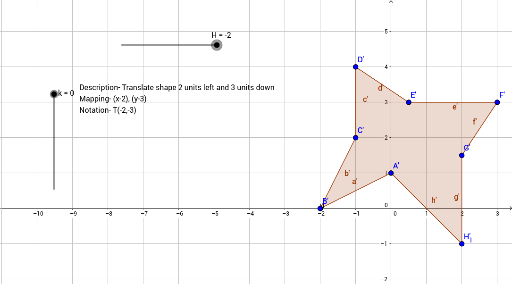
This GeoGebra example demonstrates the complete process of translating a polygon by a given vector. The core mathematical concepts are two-dimensional vectors and geometric transformations, specifically translation, highlighting how vector addition preserves the shape and size of the figure while shifting all points by a constant displacement. The construction uses the Point command to create vertices A through H, the Polygon command to form the original polygon poly1, the Vector command to define the translation vector u, and the Translate command to move the entire polygon along with its edges and vertices, producing the translated polygon poly1' and corresponding points A' through H'. Text labels are also included for clarity. This example is suitable for middle or high school geometry and introductory vector lessons, helping students visualize how translation works in the coordinate plane and how vectors determine the direction and distance of movement.
GeoGebra Commands & Parameters
Point(Circle[A, 2.23606797749979]) → BPolygon(A, B, C, D, E, F, G, H_1) → poly1, a, b, c, d, e, f, g, hVector(B, I) → uTranslate(A, u) → A'Translate(B, u) → B'Translate(C, u) → C'Translate(D, u) → D'Translate(E, u) → E'Translate(F, u) → F'Translate(G, u) → G'Translate(H_1, u) → H'Polygon(A', B', C', D', E', F', G', H') → poly1', a', b', c', d', e', f', g', h'