
Vector Functions in 3D: Parameterized Curves via Vectors
Loading the math board and drawing, please wait…
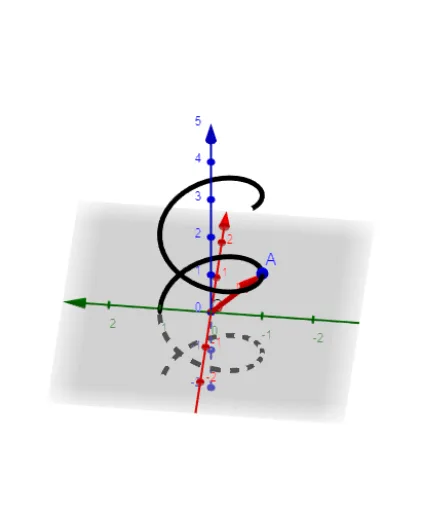
This example demonstrates how to construct vector functions in three-dimensional space using a parameterized (Cartesian) description, linking the evolution of vectors to a space curve and to related quantity ideas such as proportions and definite integrals. It focuses on key concepts including 3D vectors (magnitude and direction), vector-valued functions, and parametric curve visualization in 3D (graphing in space). Construction-wise, the GeoGebra setup uses CurveCartesian to build the Cartesian space curve C from the component functions f, g, h, and uses Vector to create vector objects tied to the parameter t (with an initial parameter t0). Additional objects r and A serve as parameters for scaling, direction, or initial placement of vectors. Suitable for high school to early university, especially for calculus/analytic geometry instruction and interactive exploration of vector-function geometry.
GeoGebra Commands & Parameters
CurveCartesian((f(t), g(t), h(t)), t, -10, 10) → CVector((f(t_{0}), g(t_{0}), h(t_{0}))) → r
AI Drawing Prompt Reference
Draw a 3D parametric curve C using functions f(t), g(t), and h(t) from t=-10 to t=10. Then draw a vector r pointing to the corresponding point on curve C at time t0.
The prompt above was compiled from the original drawing commands and is for reference only.