
Vector Equations
Loading the math board and drawing, please wait…
In collections
Complex Math
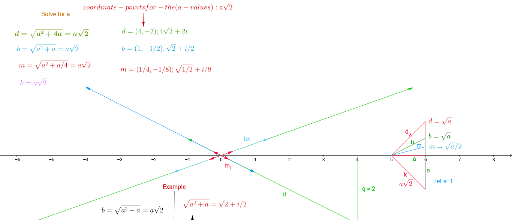
This example demonstrates the concept of vector equations. It constructs vectors, points, segments, and other objects to show vector transformations such as mirroring and orthogonal lines. Commands like Vector, Point, Segment, Mirror, and OrthogonalLine are used. Suitable for high school mathematics, particularly in coordinate geometry and vector courses.
GeoGebra Commands & Parameters
Vector((4, -2)) → dVector((1, -0.5)) → b_1Vector((0.25, -0.125)) → m_1Vector(((4 * sqrt(2)), 2)) → dxVector((sqrt(2), 0.5)) → bxVector((sqrt(0.5) / 2, 0.125)) → mxPoint(xAxis) → APoint(xAxis) → BSegment(A, B) → fSegment(B, C) → gSegment(A, C) → d_2Mirror(B, xAxis) → B'Mirror(C, xAxis) → C'Segment(B', C') → g'Mirror(A, xAxis) → A'Mirror(C, xAxis) → C'_1Segment(A', C'_1) → kPoint(Circle[B, 0.5]) → DSegment(B, D) → hSegment(A, D) → bPoint(Circle[B, 0.25]) → ESegment(B, E) → jSegment(A, E) → mPoint(mx) → FPoint(dx) → GSegment(F, G) → iPoint(d) → HSegment(F, H) → lOrthogonalLine(F, i) → nOrthogonalLine(F, l) → pMirror(dx, n) → dx'Mirror(bx, n) → bx'Mirror(mx, n) → mx'Mirror(b_1, p) → uMirror(d, p) → vMirror(m_1, p) → wPoint(d) → JSegment(I, J) → qVector(M, N) → aSegment(O, P) → rVector(Q, R) → cVector((4, -2)) → k_2Vector(S, T) → s
AI Drawing Prompt Reference
On a coordinate plane, draw several vectors from the origin, including a main vector, a smaller proportional vector, and a finer subdivision vector, along with another set of vectors with the same direction but lengths scaled by square roots. Place two points on the x-axis and connect them with a segment, then add a third point to form a triangle. Reflect all three points across the x-axis and connect the reflected points to form a symmetric triangle. Using one point as a center, draw two circles with different radii, pick points on these circles, and connect them to the center and another vertex. Pick points on a slanted vector, connect them to form a segment, and draw perpendicular lines to that segment. Reflect several vectors across these perpendicular lines to show transformed vectors. Finally, add additional vectors and segments connecting various points to illustrate vector equations and geometric transformations.
The prompt above was compiled from the original drawing commands and is for reference only.