
Vector Equation of a Line vs Point-Gradient Form
Loading the math board and drawing, please wait…
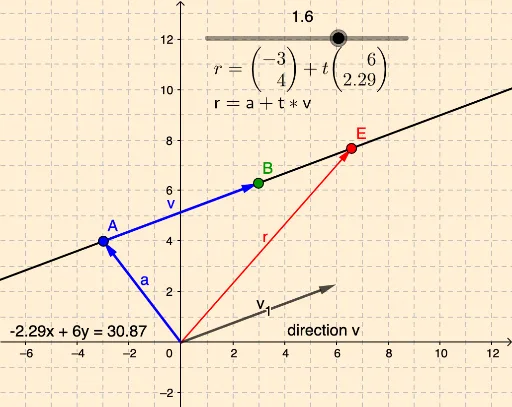
This GeoGebra example visually compares two common representations of a straight line in 2D: the vector equation and the point-gradient (point-slope) form. It demonstrates how both forms describe the same geometric line using a direction vector and a point, or a slope and a point. Core mathematical concepts include direction vectors, position vectors, slope, and parametric representation of lines. The construction uses GeoGebra commands such as Vector to create vector v, Line to draw the line, and Slope to compute its gradient. Objects include points B and A, vectors v and v_1, lines a, a_1, and g, along with text labels text1 through text5 to display the equations. This is suitable for high school or early college students learning analytic geometry, helping them see the equivalence between algebraic forms and their geometric meaning. By dragging points or adjusting the vector, learners can observe how both equations update simultaneously, reinforcing the connection between direction, slope, and position.
GeoGebra Commands & Parameters
Vector(A, B) → vVector(A) → aLine(A, v) → a_1Vector(E) → rSlope(a_1) → m
AI Drawing Prompt Reference
Draw a 2D line represented in two ways: using a direction vector and a point, and using a slope and a point. First, draw a line through a specified point in the direction of a given vector. Then, draw another line through the same point with a slope determined by the first line. Display the equations of both lines and label the direction vector, position vector, slope, and parametric equation to observe the equivalence of the two representations.
The prompt above was compiled from the original drawing commands and is for reference only.