
Geometric Visualization of Parametric Curves in 2D and 3D
Loading the math board and drawing, please wait…
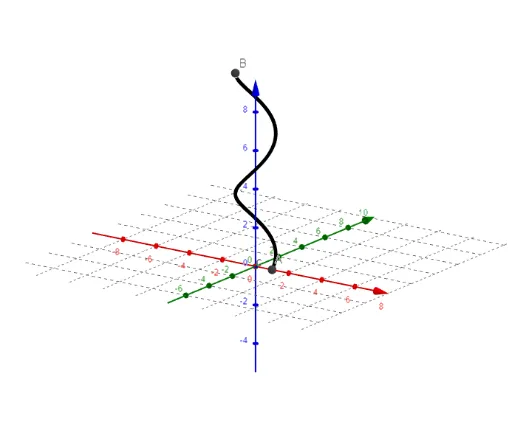
This example demonstrates how to build and visualize parametric curves in both 2D and 3D using a parameter-driven construction. It highlights key ideas of parametric equations (using a parameter t to control point coordinates), representation of curves in Cartesian coordinates, and the use of vectors to define directions and relationships that help generate the geometry in space. The construction is centered on GeoGebra commands and objects: CurveCartesian to draw curves from Cartesian coordinate expressions, Vector to encode direction/offset information, and Textfield with LaTeX together with multiple InputBox inputs to control parameters and display formulas. Intermediate variables (e.g., a, b, t, f, g, h, B, c, r, d, e, p, q, eq1, etc.) are used to link the input conditions to the final curve(s), while text labels (text1, text2, text3) clarify what each parameter controls. Suitable for advanced secondary school, early undergraduate geometry/analytic geometry instruction, and for classroom or self-study demonstrations where learners adjust parameters and observe the resulting curve transformations.
GeoGebra Commands & Parameters
CurveCartesian(f(u), g(u), h(u), u, 0, t) → cVector(B) → rTextfield(a) → InputBox1Textfield(b) → InputBox2Textfield(f) → InputBox3Textfield(g) → InputBox4Textfield(h) → InputBox5LaTeX(B, true, true) → text1LaTeX(r, true, true) → text2LaTeX(A, true, true) → text3
AI Drawing Prompt Reference
Create a visualization of parametric curves in both 2D and 3D. The main curve is defined by three coordinate functions of a parameter t, which ranges from 0 to an adjustable upper limit. Include a vector originating from the origin to a point, representing direction or offset. Provide several input fields for adjusting parameters a, b, and the three coordinate functions. Display text labels with mathematical notation showing the coordinates of two points and the vector components. The layout should clearly show how changing parameters affects the curve's shape, with the vector and points highlighted for clarity.
The prompt above was compiled from the original drawing commands and is for reference only.