
Vector Components Demo by Tom Walsh
Loading the math board and drawing, please wait…
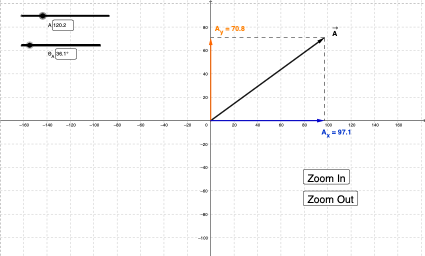
This example demonstrates how to dynamically display the x and y components of a vector by entering its magnitude and direction; core math concepts include vector decomposition, trigonometric functions, and coordinate geometry; construction highlights the use of GeoGebra commands/objects like Intersect, Vector, If, Textfield, Segment, and Angle; suitable for high school and above students to understand vector decomposition in Cartesian coordinates, and for physics teaching purposes.
GeoGebra Commands & Parameters
Intersect(xAxis, yAxis) → CVector(C, B) → uVector(C, A) → vIf(d, Vector[u + v], Vector[v - u]) → wTextfield(Θ_1) → InputBox1Textfield(Θ_1) → InputBox2Textfield(r_1) → InputBox3Textfield(Θ_2) → InputBox4Textfield(r_2) → InputBox5Segment(A, C) → aAngle((100, 0), (0, 0), D) → αSegment(E, D) → fSegment(A, G) → bSegment(A, F) → cVector((0, 0), G) → gVector((0, 0), F) → h