
Vector Arithmetic – Adapted from Integral
Loading the math board and drawing, please wait…
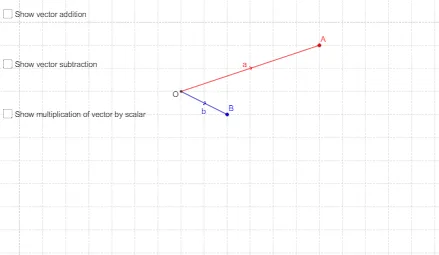
This GeoGebra example provides an interactive visual introduction to basic vector arithmetic in two dimensions, covering addition, subtraction, and scalar multiplication. It demonstrates how vectors can be represented geometrically and how operations correspond to translations and triangle/parallelogram rules. The construction uses commands such as Intersect, Vector, Translate, Segment, Point, and Midpoint to build multiple vectors, auxiliary segments, and text labels that clarify the results. Suitable for high school or introductory college students learning vector algebra, this resource is ideal for classroom demonstrations or self-study, helping learners grasp the geometric intuition behind vector operations.
GeoGebra Commands & Parameters
Intersect(xAxis, yAxis) → OVector(O, A) → aVector(O, B) → bTranslate(A, b) → A'Vector(A, A') → wTranslate(A, v_1) → A'_1Segment(O, A) → cSegment(O, B) → dSegment(O, A') → eSegment(A, A') → fSegment(A, A'_1) → gSegment(O, A'_1) → hVector(O, A') → a'Vector(O, A'_1) → a_1Point(O, u) → ISegment(O, I) → mMidpoint(m) → J
AI Drawing Prompt Reference
Draw a 2D coordinate system with two vectors, show the addition of vectors using the triangle rule and the parallelogram rule, label the start and end points of the vectors, and include auxiliary line segments and midpoints, with a slider to demonstrate vector transformations.
The prompt above was compiled from the original drawing commands and is for reference only.