
Vector Addition Example by Stewart McWilliam
Loading the math board and drawing, please wait…
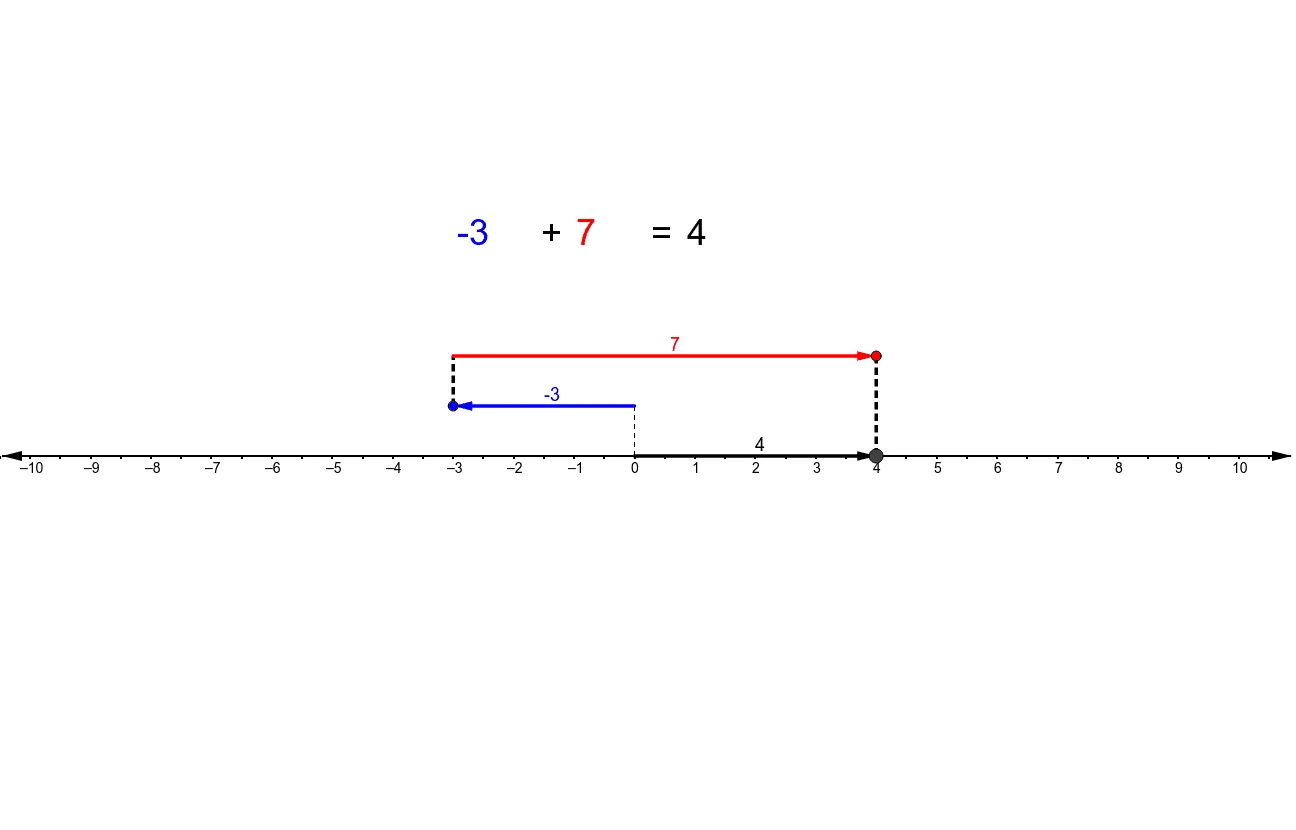
This example demonstrates the addition of two directed numbers using GeoGebra vector tools, providing a visual representation of vector addition. Key math concepts include vector addition, directed numbers, and geometric representation. Constructed using commands like Point, Segment, and Vector. Suitable for middle school students and above learning vector operations and spatial geometry, or for university-level foundational mathematics instruction.
GeoGebra Commands & Parameters
Point(baseN1) → CPoint(baseN2) → ESegment(A, B) → cVector(B, C) → uSegment(C, D) → aVector(D, E) → vSegment(E, F) → bVector(A, F) → Result
AI Drawing Prompt Reference
Draw a vector addition diagram. Start with a horizontal segment as a baseline, with two endpoints. From the left endpoint, draw an upward-slanting vector to an intermediate point. From that point, draw a downward-slanting vector to another intermediate point. Finally, from the right endpoint of the baseline, draw a vector to the final point, which coincides with the tip of the second vector. Include three segments and three arrowed vectors, where the last vector represents the sum of the first two, illustrating the head-to-tail method.
The prompt above was compiled from the original drawing commands and is for reference only.