
Vector Addition Demo by Brajbhushan Kumar Kushawaha
Loading the math board and drawing, please wait…
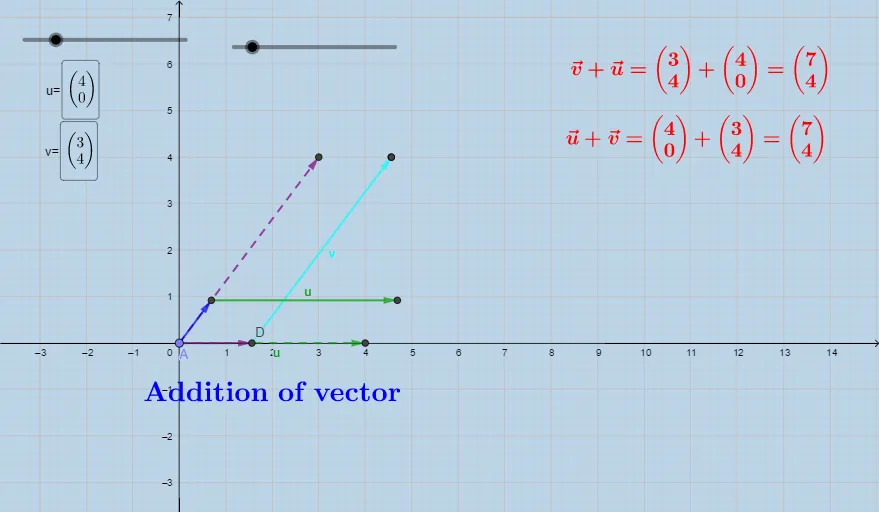
This example demonstrates the geometric meaning of vector addition, visually showing the process and result of adding vectors. Core math concepts include vectors, parallelogram/triangle rule for vector addition, and vector coordinate operations. Constructed using GeoGebra commands/objects like Point, Vector, Translate, and Textfield. Suitable for high school students learning vector addition or math enthusiasts needing a visual understanding of vector operations.
GeoGebra Commands & Parameters
Point(yAxis) → AVector(A, D) → wTranslate(C, w) → C'Vector(D, C') → bVector(A, E) → cVector(A, F) → dTranslate(B, d) → B'Vector(F, B') → eVector(A, G) → fTextfield(u) → InputBox1Textfield(v) → InputBox2
AI Drawing Prompt Reference
Draw a coordinate-geometry diagram that demonstrates vector addition geometrically. In the coordinate plane, take a starting point A, and form vector w from A toward point D. Translate this vector w so that it begins at point C, producing point C′, then draw vector b from D to C′. From A, also draw vectors c and d toward their respective endpoints E and F. Translate vector d starting at point B to obtain point B′, then draw vector e from F to B′. Finally draw vector f from A to point G. Include two input fields labeled for u and v.
The prompt above was compiled from the original drawing commands and is for reference only.