
Vector Addition by Tom Walsh
Loading the math board and drawing, please wait…
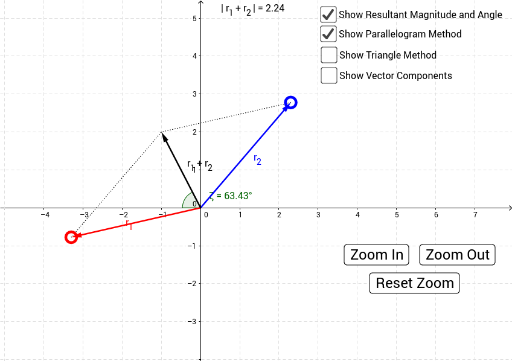
This example demonstrates vector addition using the triangle and parallelogram methods. It involves core mathematical concepts like vector addition and geometric constructions. Key GeoGebra commands/objects used include Intersect, Ray, Point, Vector, Segment, Angle, Length, and Translate. Suitable for high school mathematics teaching and geometric construction learning.
GeoGebra Commands & Parameters
Intersect(xAxis, yAxis) → BRay(B, F) → sPoint(s) → JRay(B, E) → rPoint(r) → IVector(B, A) → uVector(B, C) → vVector(AA, E) → r_2Vector(CC, AA) → r_1Segment(C, F) → aSegment(A, F) → bVector(B, AX) → eVector(B, AY) → fVector(B, CX) → gVector(B, CY) → hVector(AA, GG) → kVector(GG, E) → lVector(HH, AA) → jVector(B, HH) → mAngle(G, B, I) → γAngle(I, B, H) → βAngle(H, B, I) → δAngle(I, B, G) → εLength(uv) → oTranslate(e, AA) → qAngle(J, B, H) → ζAngle(J, B, G) → αAngle(G, B, J) → θAngle(H, B, J) → ηLength(w) → ooo
AI Drawing Prompt Reference
Draw a vector addition demonstration showing both triangle and parallelogram methods. Start with the intersection of coordinate axes, then create two rays and their corresponding points. Define two vectors and illustrate their sum using both methods. Label key angles and lengths, and display the geometric construction process involving vectors, segments, and angle measurements. Highlight the transformation and measurement steps in the construction.
The prompt above was compiled from the original drawing commands and is for reference only.