
Vector Addition and Geometric Construction
Loading the math board and drawing, please wait…
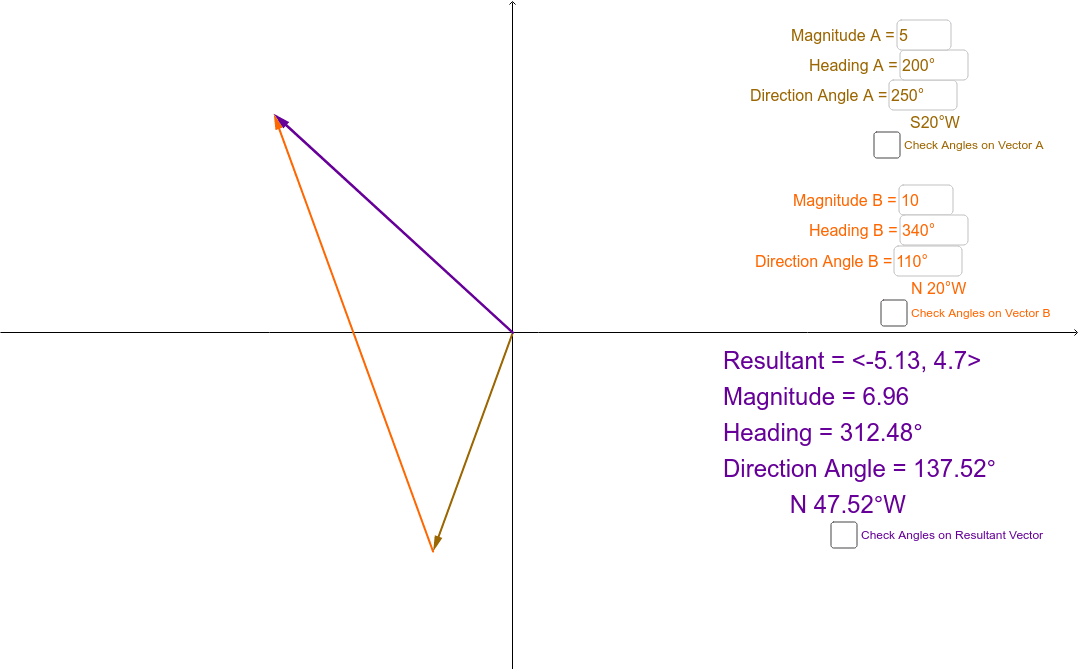
This example demonstrates the geometric meaning of vector addition by constructing a triangle, circle, and line segments. Key mathematical concepts include vector addition, median line, centroid, and coordinate geometry. Construction involves GeoGebra commands such as Circle, Line, Intersect, Segment, and Rotate. Suitable for middle or high school mathematics to understand the connection between vectors and geometry.
GeoGebra Commands & Parameters
Circle(Turn, 1) → BqbCircCircle(Turn, 1.5) → BdaCircLine(Turn, xAxis) → bCircle(Turn, 2) → BheadCircIntersect(BheadCirc, b, 1) → DIntersect(BheadCirc, b, 2) → ASegment(D, A) → jIntersect(BdaCirc, j, 2) → BdaStartRotate(BdaStart, Bda, Turn) → BdaPtRay(Turn, BdaPt) → BrayTextfield(Ada) → AdaInputTextfield(Ahead) → AheadInputIf(0° < Ahead < 180°, "E", "W") → AewIf(90° < Ahead < 270°, "S", "N") → AnsIf(0° ≤ Ahead ≤ 90°, Ahead, If[90° < Ahead ≤ 180°, 180° - Ahead, If[180° < Ahead ≤ 270°, Ahead - 180°, 360° - Ahead]]) → AqbPoint(yAxis) → AheadStartPoint(xAxis) → AdaStartIntersect(xAxis, yAxis) → CRay(C, AdaStart) → cRay(C, AheadStart) → dRotate(AdaStart, Ada, C) → AdaPtCircle(C, AdaStart) → AdaCircArc(AdaCirc, AdaStart, AdaPt) → AdaArcRotate(C, Ada) → C'Ray(C', AdaPt) → ArayCircle(C, AheadStart) → AheadCircRotate(AheadStart, (-Ahead), C) → AheadPtCircle(C, 1.5) → AqbCircIntersect(AqbCirc, d, 1) → AqbNorthIntersect(AqbCirc, yAxis, 1) → AqbSouthIntersect(AqbCirc, Aray, 1) → AqbPointIf(Ans ≟ "N", If[Aew ≟ "W", Arc[AqbCirc, AqbNorth, AqbPoint], Arc[AqbCirc, AqbPoint, AqbNorth]], If[Aew ≟ "W", Arc[AqbCirc, AqbPoint, AqbSouth], Arc[AqbCirc, AqbSouth, AqbPoint]]) → AqbArcRotate(AheadStart, -0.01*°, C) → AheadDirAngle(AheadStart, C, AheadDir) → HangleCircumcircleArc(AheadStart, AheadDir, AheadPt) → AheadArcVector(C, Apoint) → AvecIf(0° ≤ Bhead ≤ 90°, Bhead, If[90° < Bhead ≤ 180°, 180° - Bhead, If[180° < Bhead ≤ 270°, Bhead - 180°, 360° - Bhead]]) → BqbTextfield(Amag) → AmagInputTextfield(Bmag) → BmagInputTextfield(Bda) → BdaInputTextfield(Bhead) → BheadInputText(If[0° < Bhead < 180°, "E", "W"]) → BewText(If[90° < Bhead < 270°, "S", "N"]) → BnsVector((Ax, Ay), (Ax + Bx, Ay + By)) → BvecVector(C, (Rx, Ry)) → RvecLine(Turn, yAxis) → iIntersect(BheadCirc, i, 2) → BheadStartIntersect(BheadCirc, i, 1) → ESegment(BheadStart, E) → kRotate(BheadStart, -0.01*°, Turn) → BheadDirRotate(BheadStart, (-Bhead), Turn) → BheadPtCircumcircleArc(BheadStart, BheadDir, BheadPt) → BheadArcArc(BdaCirc, BdaStart, BdaPt) → BdaArcIntersect(BqbCirc, k, 1) → BqbNorthIntersect(BqbCirc, Bray) → BqbPoint,Intersect(BqbCirc, k, 2) → BqbSouthIf(Bns ≟ "N", If[Bew ≟ "W", Arc[BqbCirc, BqbNorth, BqbPoint], Arc[BqbCirc, BqbPoint, BqbNorth]], If[Bew ≟ "W", Arc[BqbCirc, BqbPoint, BqbSouth], Arc[BqbCirc, BqbSouth, BqbPoint]]) → BqbArcAngle(AdaStart, C, (Rx, Ry)) → RdaAngle((Rx, Ry), C, AheadStart) → RheadIf(90° < Rhead < 270°, "S", "N") → RnsIf(0° < Rhead < 180°, "E", "W") → RewIf(0° ≤ Rhead ≤ 90°, Rhead, If[90° < Rhead ≤ 180°, 180° - Rhead, If[180° < Rhead ≤ 270°, Rhead - 180°, 360° - Rhead]]) → RqbRay((0, 0), (Rx, Ry)) → RRayIntersect(AheadCirc, RRay) → RheadPt,CircumcircleArc(AheadStart, AheadDir, RheadPt) → RheadArcRotate(AdaStart, Rda, C) → RdaPtArc(AdaCirc, AdaStart, RdaPt) → RdaArcIntersect(AqbCirc, RRay, 1) → RqbPointIf(Rns ≟ "N", If[Rew ≟ "W", Arc[AqbCirc, AqbNorth, RqbPoint], Arc[AqbCirc, RqbPoint, AqbNorth]], If[Rew ≟ "W", Arc[AqbCirc, RqbPoint, AqbSouth], Arc[AqbCirc, AqbSouth, RqbPoint]]) → RqbArc
AI Drawing Prompt Reference
The figure consists of a triangle, two circles, and several line segments, illustrating vector addition, medians, centroid, and coordinate geometry. The triangle's vertices intersect with circles to form line segments, which intersect circles to create rays after rotation. Arcs are drawn between circle centers and intersection points. Medians, centroid points, and points on the coordinate axes are included, with vector addition visualized through these geometric relationships. The layout reflects a logical construction sequence, suitable for understanding the connection between vectors and geometry.
The prompt above was compiled from the original drawing commands and is for reference only.