
Using Iteration to Find Roots of Polynomials
Loading the math board and drawing, please wait…
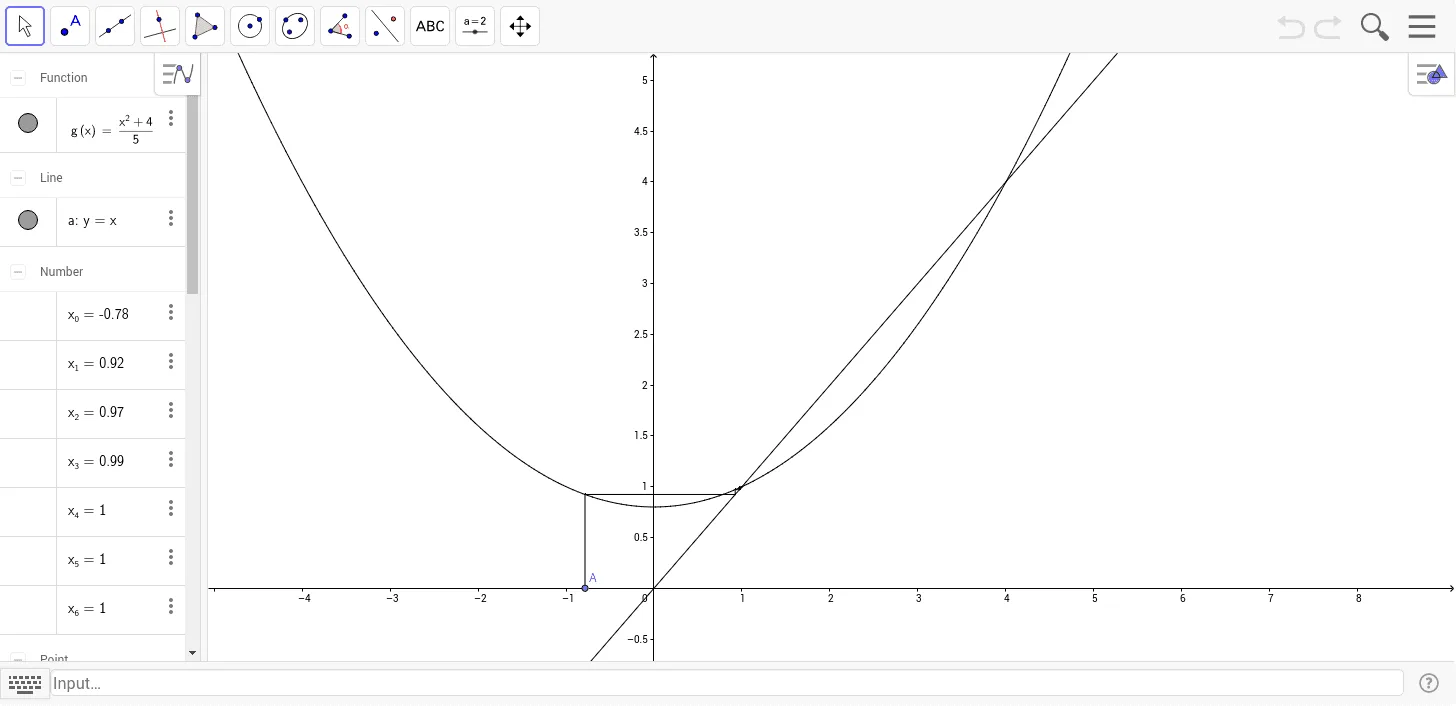
This example demonstrates how to use iteration to find the roots of polynomials. Key mathematical concepts include iteration and the concept of roots. Using commands from the construction summary, one can observe the use of points and segments. Suitable for high school math education or learners.
GeoGebra Commands & Parameters
Point(xAxis) → ASegment(A, (x(A), x_1)) → bSegment((x_0, g(x_0)), (x_1, x_1)) → cSegment((x_1, g(x_1)), (x_2, x_2)) → dSegment((x_3, g(x_3)), (x_3, x_3)) → eSegment((x_4, g(x_4)), (x_4, x_4)) → fSegment((x_5, g(x_5)), (x_5, x_5)) → hSegment((x_6, g(x_6)), (x_6, x_6)) → iSegment((x_1, x_1), (x_1, g(x_1))) → jSegment((x_2, x_2), (x_2, g(x_2))) → kSegment((x_3, x_3), (x_3, g(x_3))) → lSegment((x_4, x_4), (x_4, g(x_4))) → mSegment((x_5, x_5), (x_5, g(x_5))) → nSegment((x_6, x_6), (x_6, g(x_6))) → pSegment((x_2, g(x_2)), (x_3, x_3)) → qSegment((x_3, g(x_3)), (x_4, x_4)) → rSegment((x_4, g(x_4)), (x_5, x_5)) → sSegment((x_5, g(x_5)), (x_6, x_6)) → t
AI Drawing Prompt Reference
Draw the iteration process for finding roots of a polynomial. Start by taking a point A on the x-axis, then iteratively find the roots by drawing a horizontal segment connecting the current x-value to the function value, and a vertical segment connecting the function value to the x-axis. Repeat this process until all roots are found.
The prompt above was compiled from the original drawing commands and is for reference only.