
Unit Tangential and Normal Vectors
Loading the math board and drawing, please wait…
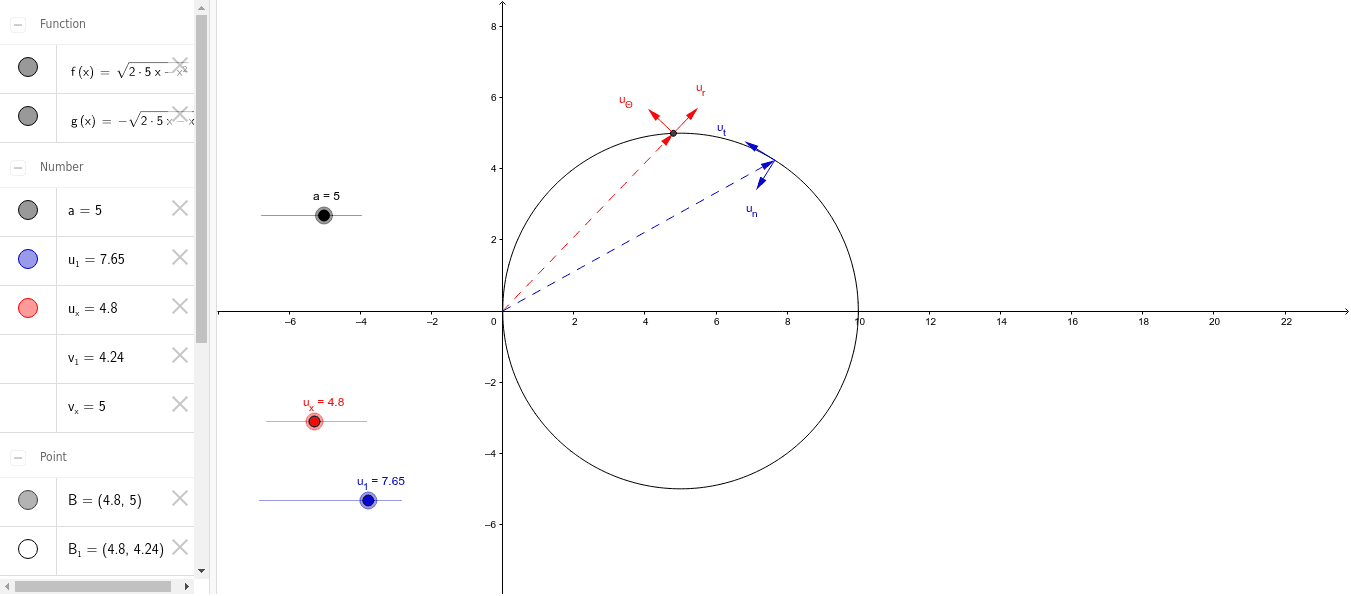
This example demonstrates how unit tangential (red) and unit normal (blue) vectors change as the slider u_x is moved. Key mathematical concepts include vectors and coordinate geometry. The Vector command is used to construct vectors, and Slider Animation is employed to create the slider. Suitable for high school mathematics education and learning about vector concepts.
GeoGebra Commands & Parameters
Vector((0, 0), (u_x, v_x)) → rVector((u_x, v_x), ((u_x * (1 + 1 / sqrt(u_x^(2) + v_x^(2)))), (v_x * (1 + 1 / sqrt(u_x^(2) + v_x^(2)))))) → u_rVector((u_x, v_x), (u_x - v_x / sqrt(u_x^(2) + v_x^(2)), v_x + u_x / sqrt(u_x^(2) + v_x^(2)))) → u_ΘVector((0, 0), (u_1, v_1)) → r_1Vector((u_1, v_1), (u_1 - sqrt(((2 * a) * u_1) - u_1^(2)) / a, v_1 - 1 + u_1 / a)) → u_tVector((u_1, v_1), (u_1 + 1 - u_1 / a, v_1 - sqrt(((2 * a) * u_1) - u_1^(2)) / a)) → u_n
AI Drawing Prompt Reference
Draw a coordinate system with a point that changes as slider u_x moves. Connect this point to the origin with a red vector. From this point, draw two unit vectors: one in the tangential direction in red and one in the normal direction in blue. Observe how these unit vectors change as u_x is moved.
The prompt above was compiled from the original drawing commands and is for reference only.