
Unit Circle Special Angles: Radian Measures of 30°, 45°, 60°
Loading the math board and drawing, please wait…
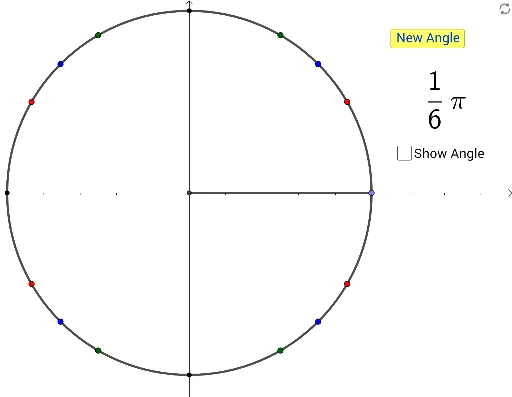
This interactive GeoGebra example visualizes the radian measures of the special reference angles 30°, 45°, and 60° on the unit circle, helping students grasp the connection between degrees and radians. The core mathematical concepts include the unit circle, radian measure, special angles (π/6, π/4, π/3), and reference angles in trigonometry. Construction details: the unit circle is drawn using the Circle command, radii are rotated with the Rotate command to form different angles, Angle commands label the angle sizes, and Segment commands connect points to form triangles. Key objects include the center O, points A, B, C on the circle, and interactive buttons (button1, button2) for random selection or step-by-step exploration. This resource is ideal for high school or introductory college students learning trigonometry and radian measure, and serves as an engaging classroom demonstration or self-paced study tool.
GeoGebra Commands & Parameters
Intersect(xAxis, yAxis) → ARandomElement({π / 6, π / 4, π / 3, π / 2, (2 * π / 3), (3 * π / 4), (5 * π / 6), (7 * π / 6), (5 * π / 4), (4 * π / 3), (3 * π / 2), π, (5 * π / 3), (7 * π / 4), (11 * π / 6), 0}) → aPoint(xAxis) → BCircle(A, B) → cRotate(B, a, A) → B'Angle(B, A, B') → αSegment(A, B') → fSegment(A, B) → gPoint(c) → CPoint(c) → DPoint(c) → EPoint(c) → FPoint(c) → GPoint(c) → HPoint(c) → IPoint(c) → JPoint(c) → KPoint(c) → LPoint(c) → MPoint(c) → NRandomElement({"sin", "cos", "tan"}) → bIntersect(c, yAxis, 2) → OIntersect(c, xAxis, 2) → PIntersect(c, yAxis, 1) → Q