
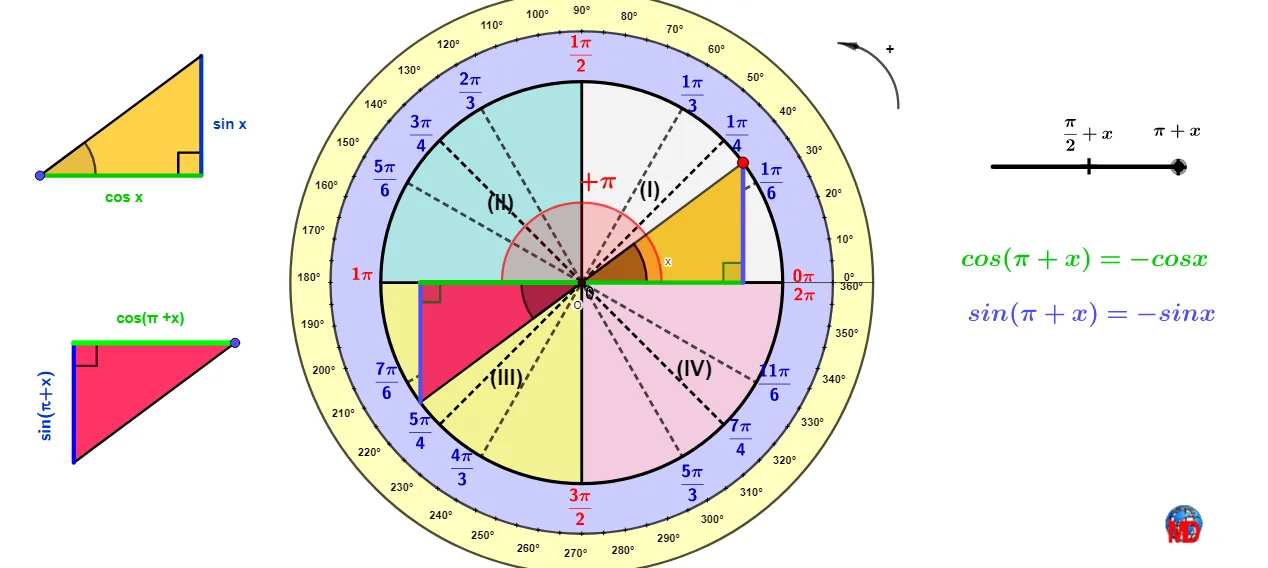
Unit-circle comparison of phase shifts: cos(π/2+x), sin(π/2+x), cos(π+x), sin(π+
Loading the math board and drawing, please wait…
This example demonstrates, on the unit circle, how shifting the angle by π/2+x and π+x transforms the cosine and sine values, and how those transformed quantities correspond visually to the baseline functions sin x and cos x. The key math ideas include the unit-circle mapping from an angle to coordinates, phase-shift identities (for π/2 and π), and geometric symmetry/sign changes. Construction approach: use Intersect, Circle, Point, Line, and Angle to define the unit circle, the angle rays, and the measurement setup; apply OrthogonalLine and Midpoint (with Segment) to obtain projections/connected points that represent function values; employ Rotate/RotateText, Translate, and Mirror to realize the phase-shift configurations; use Vector, CircleArc, CircleSector, and Ray to highlight arcs, sectors, and comparable geometric elements; optionally use Polygon for structured grouping. Multiple constructed points/angle markers and arcs (as in the model’s object list) are used to make the comparisons clear. Suitable for advanced middle school, pre-university, and early college teaching as a dynamic-geometry tool for trigonometric identity learning.
GeoGebra Commands & Parameters
Intersect(xAxis, yAxis) → OCircle(O, 1) → cIntersect(c, xAxis) → C_1, DSegment(C_1, D) → rPoint(r) → I_1Rotate(D, j, O) → MIf(j < 0, M) → M1Intersect(c, yAxis) → K, LLine(K, L) → sOrthogonalLine(M, yAxis) → aIntersect(a, yAxis) → SAngle(D, O, M) → βOrthogonalLine(M, xAxis) → bIntersect(b, xAxis) → CSegment(O, S) → dSegment(O, C) → eSegment(M, S) → gSegment(M, C) → hMidpoint(M, S) → GMidpoint(M, C) → HVector(M, G) → uVector(M, H) → vRotate(D, 0.52, O) → IAngle(I, O, D) → γRotate(D, 1.0471975511965976, O) → JAngle(D, O, J) → δMirror(J, yAxis) → M_1Mirror(I, yAxis) → NMirror(M_1, xAxis) → O_2Mirror(J, xAxis) → PMirror(I, xAxis) → QMirror(Q, yAxis) → RRotate(D, 0.7853981633974483, O) → TAngle(D, O, T) → εMirror(T, yAxis) → UMirror(T, xAxis) → VMirror(U, xAxis) → WIf(Distance[M, K] < 0.1, F) → s_4Segment(R, I) → iSegment(T, W) → kSegment(J, O_2) → lSegment(Q, N) → mSegment(P, M_1) → pSegment(L, K) → qLine(C_1, D) → tSegment(O, M) → b_1Point(t) → ZPoint(t) → E_1Point(s) → C_2Point(s) → D_2Point(s) → E_2Point(s) → F_2Segment(U, V) → c_1Point(c) → BCircleArc(O, M1, D) → k_1If(j > 0, M) → M2CircleArc(O, D, M2) → k_2Angle(I_1, O, M2) → αAngle(M1, O, I_1) → ζSegment(J, O) → fSegment(T, O) → a1Segment(I, O) → b1Segment(U, O) → a_1Segment(O, W) → d_1Segment(O, V) → e_1Intersect(c, d_1, 1) → AIntersect(c, d_1, 1) → ECircleArc(F_1, G_1, H_1) → f_1Point(f_1) → J_1Point(f_1) → K_1Vector(K_1, J_1) → wFractionText(dir) → texte3Segment(M_1, P) → g_1Segment(R, I) → h_1Segment(J, O_2) → i_1Segment(D, B_1) → j_1Point(j_1) → L_1Polygon(B_1, D_1, L_1) → t1, l_1, m_1, n_1FractionText(mesp) → texte4FractionText(mesp) → texte5Point(c) → R_1Segment(N, Q) → m_2Rotate(R_1, (-(60°)), O) → W_1Segment(O, W_1) → n_2OrthogonalLine(R_1, n_2) → p_2Intersect(p_2, n_2) → Z_1Circle(O, 1.25) → c_2Circle(O, 1) → d_2Sequence(Rotate[M + (0.35, 0), i°, O], i, 0, 360, 1) → l1Circle(O, 1.25) → s_2Sequence(Text[i + "°", Element[l1, i] - (0.065, 0.015)], i, 0, 360, 10) → l2Circle(O, 1.45) → e_2Circle(O, 1.45) → t_2Sequence(Rotate[M + (0.25, 0), i°, O], i, 0, 360, 5) → l3CircleSector(O, K, C_1) → c_3CircleSector(O, C_1, L) → d_3CircleSector(O, L, D) → e_3Circle(O, 0.15) → f_3Rotate(B_3, 60°, A_3) → C_3Ray(A_3, C_3) → n_3Segment(A_3, B_3) → p_3OrthogonalLine(B_3, p_3) → q_3Intersect(q_3, n_3) → K_3Midpoint(J, O) → M_3Midpoint(O, U) → N_3Midpoint(O, W) → O_3Midpoint(O, V) → P_3Segment(D, D + (0.45, 0)) → a_2OrthogonalLine(R_1, r) → p_1Intersect(p_1, r) → P_1Polygon(R_1, O, P_1) → t2, q_1, r_1, oAngle(Q_1, A_3, S_1) → ηPolygon(S_1, Q_1, A_3) → t3, a_3, s_1, t_1Angle(R_1, P_1, O) → θAngle(P_1, O, R_1) → ιRotate(R_1, o_1, O) → T_1Rotate(P_1, o_1, O) → U_1Polygon(O, T_1, U_1) → t4, u_1, o_2, f_2Angle(T_1, U_1, O) → κTranslate(T_1, Vector[O, If[o_1 ≟ π / 2, V_1, K_2]]) → I_2Translate(U_1, Vector[O, If[o_1 ≟ π / 2, V_1, K_2]]) → J_2Translate(O, Vector[O, If[o_1 ≟ π / 2, V_1, K_2]]) → O'Polygon(O', I_2, J_2) → t4', j_2, o', i_2Angle(U_1, O, T_1) → λAngle(P_1, O, U_1) → μAngle(S_1, Q_1, A_3) → νAngle(I_2, J_2, If[o_1 ≟ π / 2, V_1, K_2]) → ξPoint(i_2) → N_2Point(s_1) → P_2Point(a_3) → Q_2Point(o') → R_2RotateText(texte26, 90°) → texte27RotateText(texte29, 90°) → texte30Midpoint(s_1) → S_2
AI Drawing Prompt Reference
On the unit circle, illustrate how shifting the angle by π/2+x and π+x transforms cosine and sine values, and how these transformed quantities visually correspond to the baseline functions sin x and cos x. Start by drawing the unit circle and coordinate axes, then mark key angles and rays. Use orthogonal projections and connected points to represent function values. Apply rotations, translations, and reflections to demonstrate phase shifts, and highlight geometric elements with vectors, arcs, and sectors. Finally, connect all elements with line segments and points to clearly show the comparisons.
The prompt above was compiled from the original drawing commands and is for reference only.