
Unit Circle and Geometric Construction
Loading the math board and drawing, please wait…
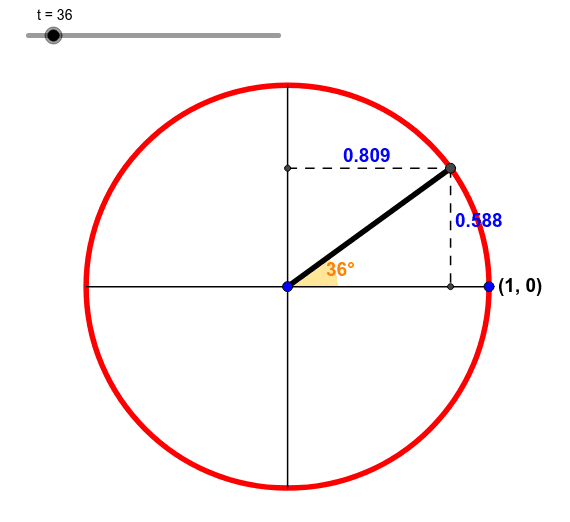
This example dynamically demonstrates the geometric construction of the unit circle and its related elements. It involves core mathematical concepts such as the unit circle, angles, vectors, polygons, and coordinate geometry. GeoGebra commands like Corner, Midpoint, Circle, Ray, Polygon, Segment, Angle, AngularBisector, Vector, Intersect, and Text are used in the construction. It is suitable for high school and above students to understand the connection between trigonometric functions and geometric constructions.
GeoGebra Commands & Parameters
Corner(text1, 4) → ICorner(text1, 3) → FCorner(text1, 1) → DMidpoint(D, F) → GCircle(A, B) → cRay(A, C) → fCorner(text1, 2) → HPolygon(I, D, H, F) → poly1, i, d, h, f_1Ray(G, M) → gSegment(A, C) → jAngle(B, A, C) → αAngularBisector(B, A, C) → mCorner(text3, 1) → OCorner(text3, 3) → PSegment(O, P) → nCircle(A, n) → pVector(H, D) → uSegment((-1, 0), (1, 0)) → qSegment((0, 1), (0, -1)) → rIntersect(e, f, 1) → JSegment(R, C) → sSegment(C, N) → bMidpoint(R, C) → SMidpoint(N, C) → TText(x(C), S + (Corner[text5, 1] - Corner[text5, 3]) / 2) → text7Text(x(C), S + (0, 0.03) + (Corner[text5, 4] - Corner[text5, 3]) / 2) → text8Text(y(C), T + Corner[text6, 4] - Corner[text6, 3]) → text9Text(y(C), T + (0.02, 0)) → text10Text(y(C), T + Corner[text6, 4] - Corner[text6, 3] - (0.06, 0)) → text11
AI Drawing Prompt Reference
Draw a unit circle and demonstrate its geometric construction. Start by drawing a ray from the center and marking special points on the circle. Construct a quadrilateral using these points and find its midpoints. Draw an angle bisector from the center and label the angle. Then, draw two line segments perpendicular to the x-axis and y-axis, and find their intersection point. Finally, label the coordinates at appropriate positions.
The prompt above was compiled from the original drawing commands and is for reference only.