
Unit Circle - All Trigonometric Ratios
Loading the math board and drawing, please wait…
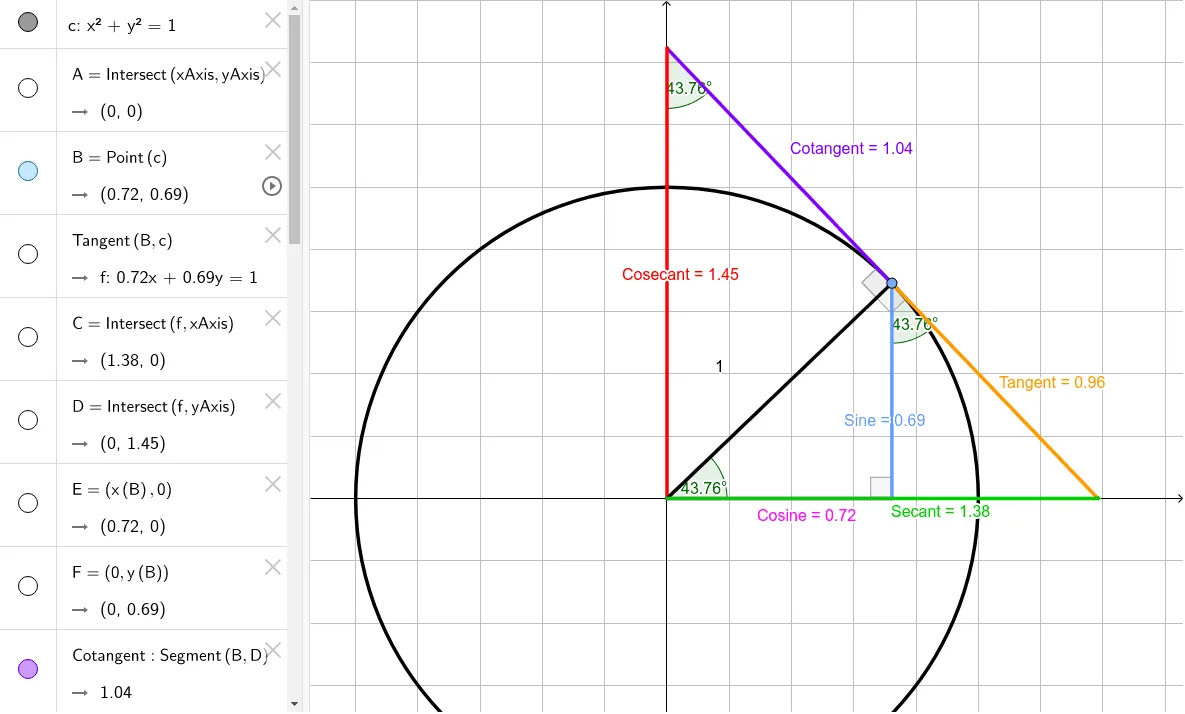
This example demonstrates all trigonometric ratios on the unit circle. Key mathematical concepts include trigonometric functions (sine, cosine, tangent, cotangent, secant, and cosecant). Using GeoGebra commands such as Intersect, Point, Tangent, and Segment, the construction of trigonometric ratios on the unit circle is illustrated. Suitable for high school mathematics education and learning.
GeoGebra Commands & Parameters
Intersect(xAxis, yAxis) → APoint(c) → BTangent(B, c) → f,Intersect(f, xAxis) → CIntersect(f, yAxis) → DSegment(B, D) → CotangentSegment(B, C) → TangentSegment(D, A) → CosecantSegment(B, E) → SineSegment(B, A) → RadiusSegment(A, E) → CosineSegment(A, C) → SecantSegment(A, F) → nSegment(F, B) → pIntersect(c, Secant, 1) → GAngle(G, A, B) → αAngle(E, B, C) → βAngle(D, B, A) → γAngle(B, E, C) → δAngle(B, E, A) → εAngle(A, B, D) → ζAngle(A, D, B) → ηAngle(C, B, A) → θ
AI Drawing Prompt Reference
Draw a unit circle centered at the origin with horizontal and vertical axes. Place a point on the circle and drop perpendiculars to both axes, forming a right triangle. Construct the tangent line at this point, intersecting both axes. Connect the center, the point on the circle, the perpendicular feet, and the axis intersections with segments, labeling them as sine, cosine, tangent, cotangent, secant, and cosecant. Also mark several angles: the central angle, angles between the tangent and axes, and acute angles in the triangle, each with its symbol.
The prompt above was compiled from the original drawing commands and is for reference only.