
Two-way Tables Unit 7
Loading the math board and drawing, please wait…
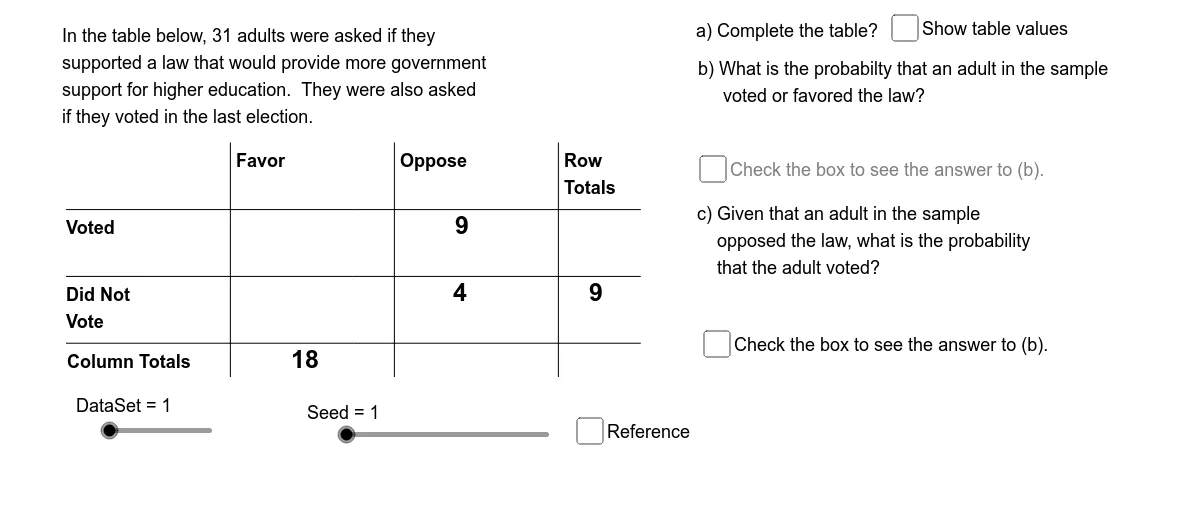
This example demonstrates the concept of two-way tables and the basic principles of conditional probability and probability. Using the GeoGebra commands in the construction summary, you can understand how to generate data sets with random numbers and adjust the data set size with slider animations. Suitable for middle school students learning probability and statistics.
GeoGebra Commands & Parameters
Element(Pr12Sq, DataSet) → Pr12Element(Pr22Sq, DataSet) → Pr22Element(Pr21Sq, DataSet) → Pr21Element(Pr11Sq, DataSet) → Pr11Min({Pr11, Pr12, Pr21, Pr22}) → PrMinMod(SlNm2, 2) → BOpElement(DDSq, DataSet) → DD0Element(RL1Sq, DataSet) → RL1Element(RL2Sq, DataSet) → RL2Element(CL1Sq, DataSet) → CL1Element(CL2Sq, DataSet) → CL2Segment((TbLf, TbTp - TbCH), (TbLf + (3.5 * TbCW), TbTp - TbCH)) → htpSegment((TbLf, TbTp - (2 * TbCH)), (TbLf + (3.5 * TbCW), TbTp - (2 * TbCH))) → hmdSegment((TbLf, TbTp - (3 * TbCH)), (TbLf + (3.5 * TbCW), TbTp - (3 * TbCH))) → hbmSegment((TbCW, TbTp), (TbCW, TbTp - (3.5 * TbCH))) → vlfSegment(((2 * TbCW), TbTp), ((2 * TbCW), TbTp - (3.5 * TbCH))) → vmdSegment(((3 * TbCW), TbTp), ((3 * TbCW), TbTp - (3.5 * TbCH))) → vrgElement(IndSq, DataSet) → IndElement(Rw1OpSq, DataSet) → Op1Element(Rw2OpSq, DataSet) → Op2Element(Cl1OpSq, DataSet) → Op3Element(Cl2OpSq, DataSet) → Op4If(OpBNm1 > 2, OpBNm2, OpBNm2 + 2) → OpBNm3Element(OpSq, OpANm1) → OpA1Element(OpSq, OpANm2 + 2) → OpA2Element(OpSq, OpBNm1) → OpC1Element(OpSq, OpBNm3) → OpC2Element(TbRCSq, OpANm1) → TbRwElement(TbRCSq, OpBNm1) → CndRCElement(CndRC, OpBNm2) → BNumElement(RCTtSq, OpBNm1) → BDnmAppend(TbRw, Element[Element[TbRCSq, OpANm3], OpANm2]) → OpASqElement(OpASq, 1) → ANm1Element(OpASq, 2) → ANm2Element(OpASq, 3) → ANm3If(DataSet ≟ 1, "an", "a") → IARandom(1, 2) → baRandom(1, 2) → bbRandom(1, 2) → bcRandom(1, 2) → bdElement(IndSq_1, DataSet) → Ind_1Element(Rw1OpSq_1, DataSet) → Op1_1Element(Rw2OpSq_1, DataSet) → Op2_1Element(Cl1OpSq_1, DataSet) → Op3_1Element(Cl2OpSq_1, DataSet) → Op4_1Element(OpSq_1, OpANm1_1) → OpA1_1Element(OpSq_1, OpANm2_1 + 2) → OpA2_1If(DataSet ≟ 1, "an", "a") → IA_1
AI Drawing Prompt Reference
Create a two-way table with two row labels 'Row1' and 'Row2', and two column labels 'Col1' and 'Col2'. The cell at the intersection of Row1 and Col1 shows the minimum value, while the other cells display randomly generated numbers.
The prompt above was compiled from the original drawing commands and is for reference only.