
Two Rotations Visualization
Loading the math board and drawing, please wait…
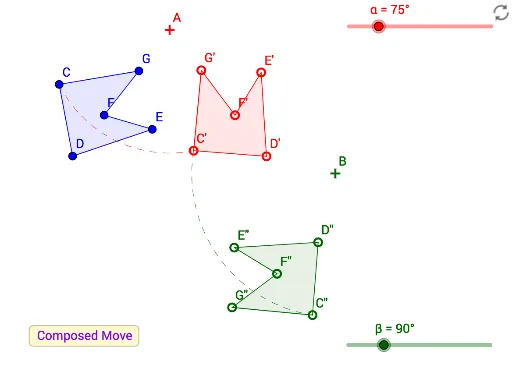
This example demonstrates the combined effect of two rotational transformations, visually showcasing the application of rotation in plane geometry. It involves core mathematical concepts such as rotation, angle, polygon construction, and vector operations. The construction leverages GeoGebra commands like Polygon, Rotate, LineBisector, Intersect, Angle, Defined, Translate, CircleArc, and Vector. Suitable for high school mathematics education to enhance understanding of transformation geometry and spatial reasoning skills.
GeoGebra Commands & Parameters
Polygon(C, D, E, F, G) → poly1, c, d, e, f, gRotate(C, α, A) → C'Rotate(D, α, A) → D'Rotate(E, α, A) → E'Rotate(F, α, A) → F'Rotate(G, α, A) → G'Polygon(C', D', E', F', G') → poly1', c', d', e', f', g'Rotate(C', β, B) → C''Rotate(D', β, B) → D''Rotate(E', β, B) → E''Rotate(F', β, B) → F''Rotate(G', β, B) → G''Polygon(C'', D'', E'', F'', G'') → poly1'', c'', d'', e'', f'', g''LineBisector(E'', E) → hLineBisector(C, C'') → iIntersect(i, h) → HAngle(E, H, E'') → γRotate(C, (t * γ), H) → C'_1Rotate(D, (t * γ), H) → D'_1Rotate(E, (t * γ), H) → E'_1Rotate(F, (t * γ), H) → F'_1Rotate(G, (t * γ), H) → G'_1Polygon(C'_1, D'_1, E'_1, F'_1, G'_1) → poly1'_1, c'_1, d'_1, e'_1, f'_1, g'_1Defined(H) → aTranslate(C, Vector[(t * Vector[E, E''])]) → C'_2Translate(D, Vector[(t * Vector[E, E''])]) → D'_2Translate(E, Vector[(t * Vector[E, E''])]) → E'_2Translate(F, Vector[(t * Vector[E, E''])]) → F'_2Translate(G, Vector[(t * Vector[E, E''])]) → G'_2Polygon(C'_2, D'_2, E'_2, F'_2, G'_2) → poly1'_2, c'_2, d'_2, e'_2, f'_2, g'_2CircleArc(A, C, C') → kVector(C, C'') → uCircleArc(B, C', C'') → pCircleArc(H, C, C'') → qAngle(C, H, C'') → δ
AI Drawing Prompt Reference
Draw a shape formed by a heptagon undergoing two rotations and several transformations. First, rotate the heptagon around one point by angle α, then around another point by angle β, to get two new heptagons. Next, find the angle bisectors of corresponding vertices of the two heptagons, and their intersection point serves as the rotation center. Rotate the original heptagon around this point by angle γ to get a fourth heptagon. Finally, translate the original heptagon along the direction of a vertex line to obtain a fifth heptagon. Connect the rotation centers and key vertices with arcs to illustrate the rotation process.
The prompt above was compiled from the original drawing commands and is for reference only.