
Two-Point Form Line Equation Example
Loading the math board and drawing, please wait…
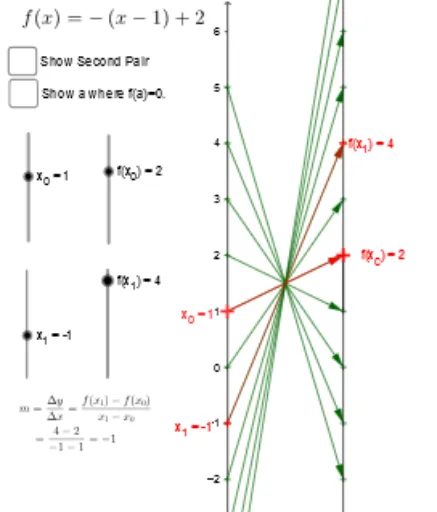
This example demonstrates how to determine a line through two points and display its equation. It involves core mathematical concepts such as the two-point form of a line equation, vectors, and coordinate geometry. The construction uses GeoGebra commands/objects like Vector, Textfield, Segment, Sequence, and Zip. It is suitable for high school students learning coordinate geometry to understand the derivation and visualization of line equations.
GeoGebra Commands & Parameters
Vector(A, B) → uTextfield(f) → inputBox1Vector(X_1, Y_1) → vSegment(f_x, F) → cSegment(E, F) → dSegment(A, X_1) → eSegment(B, Y_1) → gSegment(B, Y_1) → hSequence(-5, 5) → NZip((0, k), k, N) → x_*Zip((2, f(k)), k, N) → y_*Zip(Vector[A, B], A, x_*, B, y_*) → arr_*Zip((y(A), y(B)), A, x_*, B, y_*) → Pt_*Vector(A_0, B_0) → wTextfield(a) → InputBox1Vector(A_0, B_0) → bVector(C, D) → k
AI Drawing Prompt Reference
Draw a line passing through two given points and display its equation. Start by marking the two points and connecting them with an arrow vector to show direction. Then, draw the line on a coordinate plane and add a text box showing the two-point form equation. Next, draw perpendicular segments from each point to the axes to illustrate coordinate relationships. Finally, generate a series of equally spaced points along the line, with small arrow vectors indicating their relation to the line, and label their coordinates. The overall figure should include axes, the line, vectors, perpendicular segments, and a text box, suitable for high school geometry.
The prompt above was compiled from the original drawing commands and is for reference only.