
Two Planes by Norm Prokup
Loading the math board and drawing, please wait…
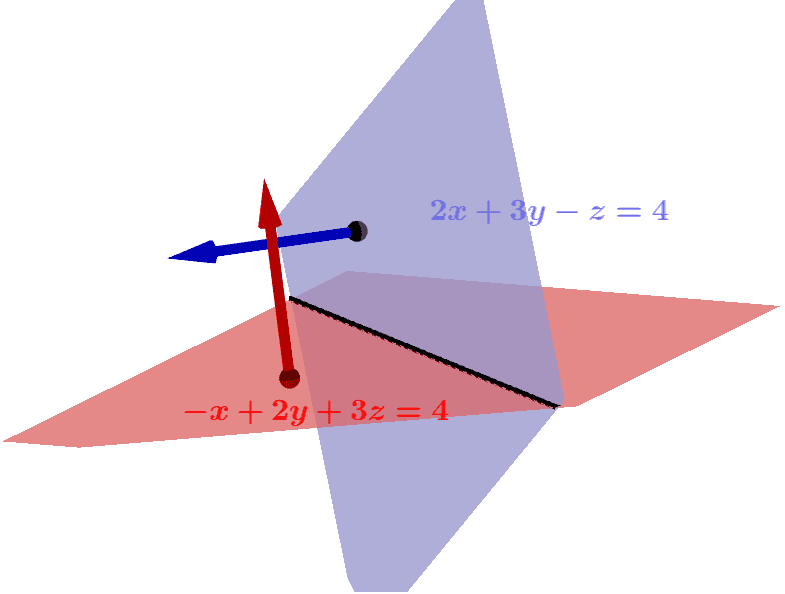
This example demonstrates the intersection line of two planes. It involves concepts from coordinate geometry such as plane equations and vectors. Using commands like PointIn, Vector, and CurveCartesian, the intersection line of two planes can be constructed. Suitable for high school and above students learning solid geometry.
GeoGebra Commands & Parameters
PointIn(a) → APointIn(b) → BVector(A, A + (-1, 2, 3)) → uVector(B, B + (2, 3, -1)) → vCurveCartesian(1 - (11 * t), 1 + (5 * t), 1 - (7 * t), t, -1, 1) → cFactors(2017) → matrix1Factors(2016) → matrix2Factors(2015) → matrix3Factors(2014) → matrix4Factors(2013) → matrix5Factors(2012) → matrix6Factors(2011) → matrix7Factors(2010) → matrix8Factors(12323459012384) → matrix9
AI Drawing Prompt Reference
Draw the intersection line of two planes. First, define two points A and B. Then, draw vector u from point A in the direction of (-1, 2, 3), and draw vector v from point B in the direction of (2, 3, -1). Finally, use vectors u and v to construct a parametric curve c representing the intersection line of the two planes.
The prompt above was compiled from the original drawing commands and is for reference only.