
Two-Digit Subtraction Interactive Demo
Loading the math board and drawing, please wait…
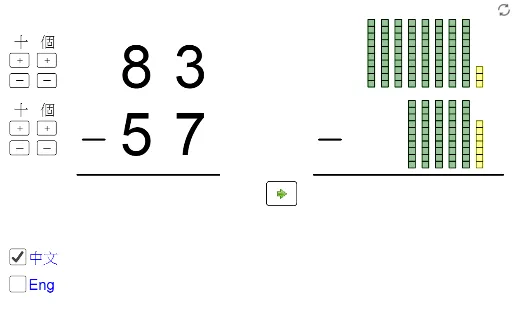
① This GeoGebra example demonstrates the vertical subtraction of two-digit numbers, visually showing the borrowing process in the ones and tens places. ② Core math concepts include integer subtraction, place value (ones/tens), and borrowing rules, involving arithmetic operations and digit decomposition. ③ Construction highlights: Textfield inputs for minuend and subtrahend, Mod and Div to extract digits, If and Sequence to manage borrowing logic, Segment and Corner to build the vertical layout, and buttons (button1_1 etc.) to trigger steps; objects include mtens, nunits, diff, atens, etc., enabling interactive step-by-step demonstration. ④ Suitable for lower elementary grades (1-3) math teaching, classroom demonstration, or self-practice, helping students understand the reasoning behind subtraction algorithms.
GeoGebra Commands & Parameters
Div(diff, 10) → atensSegment(A, B) → fIf(nunits > munits, mtens - 1, mtens) → ntensmaxIf(ntens ≟ mtens, munits - 1, 9) → nunitsmaxSequence(Polygon[{C' + (0, i), C' + (1, i), C' + (1, i + 1), C' + (0, i + 1)}], i, 0, munits - 1) → L_1Sequence(Polygon[{D + (0, i), D + (1, i), D + (1, i + 1), D + (0, i + 1)}], i, 0, nunits - 1) → L_3Sequence(Sequence[Polygon[{D + (((-(1 + d)) * j), i), D + (1 - ((1 + d) * j), i), D + (1 - ((1 + d) * j), i + 1), D + (((-(1 + d)) * j), i + 1)}], i, 0, 9], j, 1, ntens) → L_4If(nunits > munits, C' + (-2, 10), C' + (0, munits)) → C0If((t2 * nunits) ≤ munits, (0, 0), (-2, 10 - munits)) → C1Segment(E, F) → gSequence(Sequence[Polygon[{C' + (((-(1 + d)) * j), i), C' + (1 - ((1 + d) * j), i), C' + (1 - ((1 + d) * j), i + 1), C' + (((-(1 + d)) * j), i + 1)}], i, 0, 9], j, 2, mtens) → L_2Sequence(Polygon[{C' + ((-(1 + d)), i), C' + (1 - (1 + d), i), C' + (1 - (1 + d), i + 1), C' + ((-(1 + d)), i + 1)}], i, 0, 9) → L_7Sequence(Segment[D0 + (-0.2, (-j) - 0.2), D0 + (1.2, (-(j - 1)) + 0.2)], j, 1, (t2 * nunits)) → L_5Corner(text1, 1) → GCorner(text1, 3) → HSegment(G + (0, (y(H) - y(G)) / 4), H + (0, (y(G) - y(H)) / 6)) → hSegment(I - (0.02, 0.2), I + (1.02, 10.2)) → iSegment(J - (0.02, 0.2), J + (1.02, 10.2)) → jMod(diff, 10) → aunitsSequence(Polygon[{C2 + (0, i), C2 + (1, i), C2 + (1, i + 1), C2 + (0, i + 1)}], i, 0, If[nunits > munits, 10 - nunits - 1, munits - nunits - 1]) → L_{10}Sequence(Sequence[Polygon[{C2' + (((-(1 + d)) * j), i), C2' + (1 - ((1 + d) * j), i), C2' + (1 - ((1 + d) * j), i + 1), C2' + (((-(1 + d)) * j), i + 1)}], i, 0, 9], j, 1, atens) → L_{12}Textfield(ansunits) → InputBox1Textfield(anstens) → InputBox2Corner(text2, 1) → LCorner(text2, 3) → MSegment(L + (0, (y(M) - y(L)) / 4), M + (0, (y(L) - y(M)) / 6)) → kIf(ansunits ≟ "", true, false) → notinput1If(ansunits ≟ aunits', true, false) → correct1If(anstens ≟ "", true, false) → notinput2If(anstens ≟ atens', true, false) → correct2If(nunits > munits, 1, 0) → s1If(nunits > 0, 1, 0) → s2If(aunits > 0, 1, 0) → s3If(ntens > 0, 1, 0) → s4If(atens > 0, 1, 0) → s5If(t1 + t2 + t3 + t4 + t5 ≟ s1 + s2 + s3 + s4 + s5, true, false) → finishedSequence(Translate[j, Vector[(k * Vector[(-2, 0)])]], k, 0, (t4 * ntens) - 1) → L_9Sequence(Translate[i, Vector[(j * Vector[(-2, 0)])]], j, 0, (t4 * ntens) - 1) → L_8Sequence(Segment[C0 + (-0.2, (-j) - 0.2), C0 + (1.2, (-(j - 1)) + 0.2)], j, 1, (t2 * nunits)) → L_6Sequence(Polygon[{C3' + (0, i), C3' + (1, i), C3' + (1, i + 1), C3' + (0, i + 1)}], i, 0, munits - 1) → L_{14}
AI Drawing Prompt Reference
Draw a two-digit subtraction vertical demonstration with input boxes for minuend and subtrahend, showing the borrowing process in the tens and ones places. Start by drawing two input boxes, then based on the input numbers, draw the tens and ones parts of the vertical layout, use segments to indicate borrowing, and use rectangles to represent the digits. Finally, add buttons to control the step-by-step display.
The prompt above was compiled from the original drawing commands and is for reference only.