
Truncated Cube by Patrick Clément
Loading the math board and drawing, please wait…
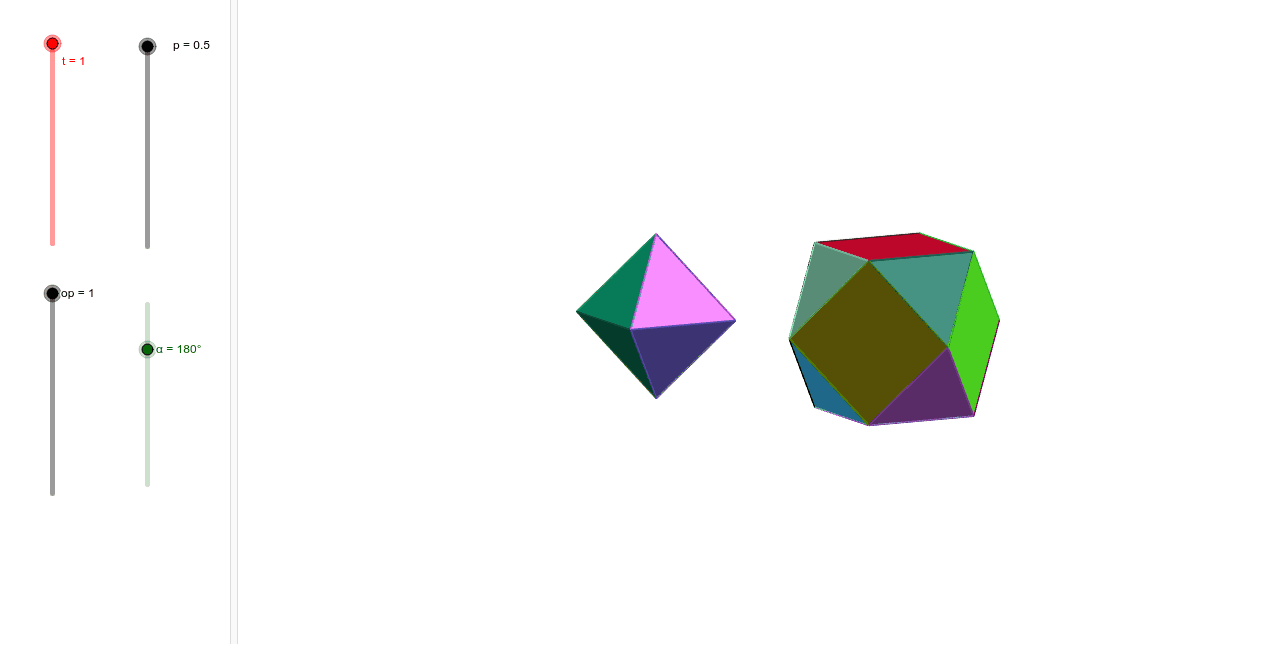
This example demonstrates the construction of a truncated cube. It involves the concept of a truncated polyhedron in solid geometry. Using GeoGebra commands such as Point, Cube, Rotate, Polygon, etc., the faces and edges of the truncated cube can be constructed. Suitable for high school or university solid geometry courses.
GeoGebra Commands & Parameters
Point(Circle[B, Distance[A, B], Segment[A, B]]) → CCube(A, B, C) → a, D, faceCDHG, faceEFGH, arêteAD, arêteAB, arêteBC, arêteCD, arêteAE, arêteDH, arêteEH, arêteEF, E, arêteBF, arêteFG, arêteCG, arêteGH, F, G, H, faceABCD, faceADHE, faceABFE, faceBCGFPoint(arêteAE, 1 - p) → KaPoint(arêteAB, p) → IaPoint(arêteAD, 1 - p) → JaRotate(Ja, 90°, zAxis) → JbRotate(Ka, 90°, zAxis) → KbPyramid(Polygon[Ia, Ja, Ka], A) → pyrA, faceAIaJa, faceAJaKa, faceAIaKa, arêteAIa, arêteAJa, arêteAKaPolygon(Ia, Ja, Ka) → triA, ka, ia, jaPlane(xAxis, yAxis) → oMirror(Ka, o) → KeMirror(Ia, o) → IeMirror(Jb, o) → JfMirror(Kb, o) → KfPolygon(Ia, Jb, Kb, Kf, Jf, Ie, Ke, Ka) → fab, ia_1, jb_1, kb_1, kf, jf, ie, ke_1, ka_2Rotate(fab, 90°, zAxis) → fbcRotate(fab, 180°, zAxis) → fcdRotate(fab, -90°, zAxis) → fdaRotate(fab, -90°, arêteAB) → fsousRotate(fab, 90°, arêteEF) → fsurCircumcircleArc(A, I, J) → cTranslate(Rotate[pyrA, (t * α), arêteAE], Vector[A, Point[c, t]]) → pyramARotate(triA, 90°, zAxis) → triBRotate(triA, 180°, zAxis) → triCRotate(triA, -90°, zAxis) → triDMirror(triA, o) → triERotate(triE, 90°, zAxis) → triFRotate(triE, 180°, zAxis) → triGRotate(triE, -90°, zAxis) → triHCircumcircleArc(B, K, J) → dTranslate(Rotate[Rotate[pyrA, 90°, zAxis], (t * α), arêteBF], Vector[B, Point[d, t]]) → pyramBCircumcircleArc(C, L, J) → eCircumcircleArc(D, M, J) → fTranslate(Rotate[Rotate[pyrA, 180°, zAxis], (t * α), arêteCG], Vector[C, Point[e, t]]) → pyramCTranslate(Rotate[Rotate[pyrA, -90°, zAxis], ((-t) * α), arêteDH], Vector[D, Point[f, t]]) → pyramDMirror(pyramD, o) → pyramHMirror(pyramA, o) → pyramEMirror(pyramB, o) → pyramFMirror(pyramC, o) → pyramG
AI Drawing Prompt Reference
Draw a truncated cube by constructing a cube first, then perform cutting and rotation on its faces to form the faces and edges of the truncated cube. Identify the vertices and faces of the cube, then use rotations and reflections to obtain the various parts of the truncated cube, and finally combine these parts to form the complete model.
The prompt above was compiled from the original drawing commands and is for reference only.