
Ellipse on the Net of a Cone
Loading the math board and drawing, please wait…
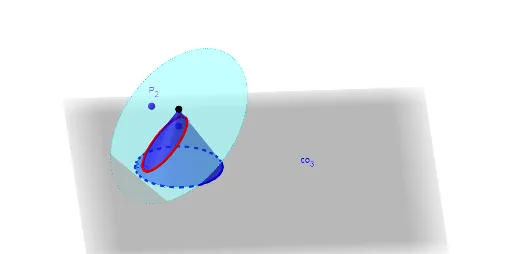
This example demonstrates the ellipse formed on the net of a cone, showing how geometric construction generates an elliptical trajectory on the conical surface. Core mathematical concepts involved include solid geometry with cones, conic sections (especially ellipses), quadratic equations, similarity principles, properties of equilateral triangles, and applications of right rectangular prisms. Construction要点 utilize GeoGebra commands such as Point for defining points, OrthogonalPlane for creating orthogonal planes, Surface and Cone for building the conical surface, IntersectPath for finding intersection paths, Sequence for generating sequences, Line and Circle for drawing lines and circles, and Rotate for rotation operations; objects include parameters like open, r, h, g, points C, P_1, n, P_2, and elements like nets net1, co1, ultimately producing elliptical loci le1, le2. Suitable for high school or introductory college mathematics courses, aiding in visualizing conic sections and solid geometry unfoldings.
GeoGebra Commands & Parameters
Point(Line[C, C + (0, 0, 1)]) → P_1PointIn(Sphere[P_1, 2]) → P_2OrthogonalPlane(P_1, Vector[P_1, P_2]) → pIf(open < 1, 0, open - 1) → p2Surface(((g * v) * cos(u)), ((g * v) * sin(u)), 0, u, 0, (a * p2), v, 0, 1) → net1Cone((r + g, 0, 0), (r + g, 0, h), r) → co1, co_2, co_3IntersectPath(p, co1) → e1Sequence(Point[e1, i], i, 0, 1, 1 / n) → le1Sequence((r / g * Angle[(x(Element[le1, i]), y(Element[le1, i])), C, (0, 0)]), i, 1, n) → lu1Sequence(Distance[Element[le1, i], S] / g, i, 1, n) → lvLine((g, 0, 0), (g, 1, 0)) → ax0If(open < 1, open, 1) → p1Circle(P_1, (2 * r), Line[P_1, P_2]) → p'Rotate(le1, ((-ar) * p1), ax0) → le2Surface(((((v * h) * cos(aa)) - (((sin(aa) * v) * r) * cos(u))) * cos((a * p2))) - (((sin((a * p2)) * v) * r) * sin(u)), ((((v * h) * cos(aa)) - (((sin(aa) * v) * r) * cos(u))) * sin((a * p2))) + (((cos((a * p2)) * v) * r) * sin(u)), (-(((v * h) * sin(aa)) + (((cos(aa) * v) * r) * cos(u)))), u, 0, ((2 * π) * (1 - p2)), v, 0, 1) → net2Sequence(Angle[(x(Element[le1, i]), y(Element[le1, i])), C, (0, 0)] - ((2 * π) * p2), i, 1, n) → lu2Rotate(co1, ((-ar) * p1), Line[(g, 0, 0), (g, 1, 0)]) → co2Sequence(If[Element[lu1, i] ≥ (a * p2) ∧ z(Element[le1, i]) > 0, net2(Element[lu2, i], Element[lv, i])], i, 1, n) → le4Sequence(If[Element[lu1, i] ≤ (a * p2) ∧ z(Element[le1, i]) > 0, net1(Element[lu1, i], Element[lv, i])], i, 1, n) → le3
AI Drawing Prompt Reference
Draw a 3D cone surface and its unfolded net, showing the elliptical trajectory on the conical surface. First, define parameters for the cone's vertex, base, and height. Then, create the cone surface. Next, construct a plane perpendicular to the cone surface to find the intersection line, which is the elliptical trajectory. Then, sequence the points on the trajectory and apply rotation to display the ellipse in 3D. Finally, the graph illustrates the relationship between the cone's unfolded net and the elliptical trajectory, helping to understand the geometric construction of the ellipse.
The prompt above was compiled from the original drawing commands and is for reference only.