
Truncated Cube: 3D Construction and Rotation
Loading the math board and drawing, please wait…
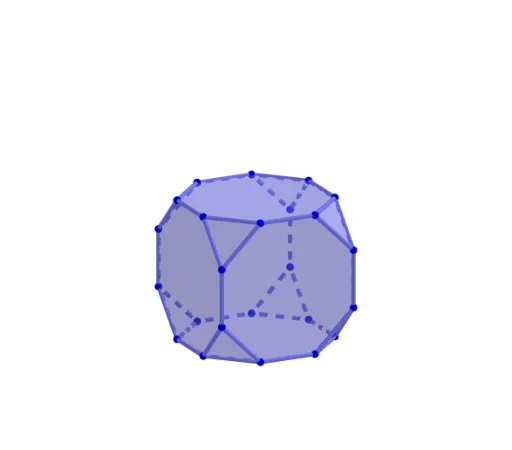
This GeoGebra example demonstrates how to construct a truncated cube in 3D view and explore its rotational symmetry. A truncated cube is an Archimedean solid composed of regular octagons and equilateral triangles, obtained by cutting off the eight vertices of a regular cube. The core mathematical concepts include solid geometry, rotational transformation, translation and mirror symmetry, and the combination of polygonal faces. Construction highlights: using Circle and Intersect commands to define base circles and intersection points, Rotate to generate vertices, Polygon to build faces (veelhoek1 through veelhoek6), and Translate, Mirror, and Line for symmetric replication and spatial positioning, resulting in the complete truncated cube. This example is suitable for upper secondary or early university students to understand 3D geometric construction, spatial transformations, and basic GeoGebra 3D modeling operations, and serves as a visual teaching aid for polyhedra.
GeoGebra Commands & Parameters
Circle(OO, 1, xOyPlane) → cIntersect(yAxis, c, 2) → ARotate(A, 45°) → BRotate(A, 90°) → CRotate(A, 135°) → DRotate(A, 180°) → ERotate(A, 225°) → FRotate(A, 270°) → GRotate(A, 315°) → HPolygon(A, B, C, D, E, F, G, H) → veelhoek1, a, b, c_1, d, e, f, g, hRotate(veelhoek1, 90°, a) → veelhoek2Rotate(veelhoek1, 90°, g) → veelhoek3Rotate(veelhoek1, 90°, e) → veelhoek4Rotate(veelhoek1, 90°, c_1) → veelhoek5Segment(F, A) → iTranslate(veelhoek1, Vector[(0, 0, i)]) → veelhoek6Mirror(veelhoek1, a) → veelhoek1'_5Mirror(C, a) → C'Rotate(C', (-(90°)), a) → JLine(OO, OOO) → asRotate(J, (-(90°)), as) → IRotate(J, 90°, as) → KRotate(J, 180°, as) → LTranslate(I, Vector[(0, 0, a)]) → MRotate(M, 90°, as) → NRotate(M, 180°, as) → ORotate(M, 270°, as) → PTranslate(A, Vector[(0, 0, i)]) → QTranslate(B, Vector[(0, 0, i)]) → RTranslate(C, Vector[(0, 0, i)]) → STranslate(D, Vector[(0, 0, i)]) → TTranslate(E, Vector[(0, 0, i)]) → UTranslate(F, Vector[(0, 0, i)]) → VTranslate(G, Vector[(0, 0, i)]) → WTranslate(H, Vector[(0, 0, i)]) → ZPolygon(B, C, J) → driehoek1, j, b_1, c_2Polygon(R, N, S) → driehoek2, s, r, nPolygon(D, E, K) → driehoek3, k, d_1, e_1Polygon(T, O, U) → driehoek4, u, t, oPolygon(F, G, L) → driehoek5, l, f_1, g_1Polygon(V, P, W) → driehoek6, w, v, pPolygon(H, A, I) → driehoek7, i_1, h_1, a_1Polygon(Z, M, Q) → driehoek8, q, z_1, mPoint(ribben3) → PP
AI Drawing Prompt Reference
Draw a truncated cube in 3D space. Start with a regular octagon on a horizontal plane as the top face. Rotate this octagon 90 degrees around each of its three edges to create three adjacent octagonal side faces, and rotate around another edge to get a fourth side face, totaling five octagonal faces. Then translate the top face vertically to form the bottom face. Using symmetry, generate eight equilateral triangles between the side octagons by mirroring and rotating, filling the gaps. Finally, connect all vertices to complete the truncated cube, showing its rotational symmetry.
The prompt above was compiled from the original drawing commands and is for reference only.