
Triple Product Rule Cube
Loading the math board and drawing, please wait…
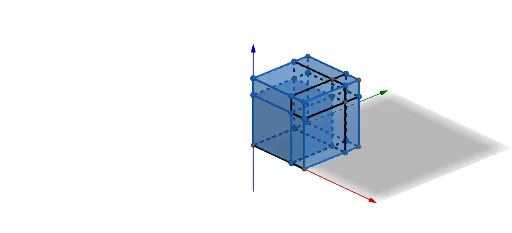
This example demonstrates the geometric application of the triple product rule in a cube, visualizing the calculation of the scalar triple product through 3D vectors. Core mathematical concepts include vectors, solid geometry, scalar triple product operations, and spatial geometric relationships. GeoGebra commands and objects used in construction are Intersect, Point, Cube, Polygon, and Segment, with objects like points A, B, C, and face ABCD. Suitable for high school and above students studying solid geometry, vector algebra, and spatial vector products, it serves as an educational tool for demonstrating geometric intuition and understanding.
GeoGebra Commands & Parameters
Intersect(zAxis, yAxis) → APoint(zAxis) → BPoint(Circle[B, Distance[A, B], Segment[A, B]]) → CCube(A, B, C) → a, D, faceCDHG, faceEFGH, edgeAD, edgeAB, edgeBC, edgeCD, edgeAE, edgeDH, edgeEH, edgeEF, E, edgeBF, edgeFG, edgeCG, edgeGH, F, G, H, faceABCD, faceADHE, faceABFE, faceBCGFPolygon(B, A, D, C) → q1, b, a_1, d, cPoint(zAxis) → IPoint(Circle[I, Distance[A, I], Segment[A, I]]) → JCube(A, I, J) → e, K, faceJKON, faceLMNO, edgeAK, edgeAI, edgeIJ, edgeJK, edgeAL, edgeKO, edgeLO, edgeLM, L, edgeIM, edgeMN, edgeJN, edgeNO, M, N, O, faceAIJK, faceAKOL, faceAIML, faceIJNMSegment(A, K) → fPoint(edgeJK) → PPoint(edgeNO) → QPoint(edgeLM) → RSegment(Q, P) → gSegment(Q, R) → hSegment(P, C) → iSegment(R, F) → jPoint(edgeIM) → SPoint(edgeIJ) → TSegment(S, F) → kSegment(T, C) → lPoint(edgeMN) → UPoint(edgeJN) → VSegment(S, V) → mSegment(T, U) → nPoint(edgeKO) → WPoint(edgeLO) → ZPoint(edgeAL) → A_1Segment(W, A_1) → pPoint(f) → B_1Segment(Z, B_1) → qSegment(U, Z) → rIntersect(r, h) → C_1Segment(C_1, G) → sSegment(V, W) → tIntersect(g, t) → D_1Segment(D_1, G) → f_1Intersect(m, n) → E_1Segment(E_1, G) → g_1
AI Drawing Prompt Reference
Draw a cube with points A, B, C, and face ABCD. First, create point A at the intersection of the z-axis and y-axis. Then, create point C on the circle with diameter AB. Use points A, B, and C to construct cube a. Draw face ABCD and connect points A, B, C, and D. Next, create point I on the z-axis and point J on the circle with diameter AI. Use points A, I, and J to construct cube e and connect points A, I, J, and K. Draw face AIJK and connect points A, I, J, and K.
The prompt above was compiled from the original drawing commands and is for reference only.