
Trigonometric Ratios on a Unit Circle
Loading the math board and drawing, please wait…
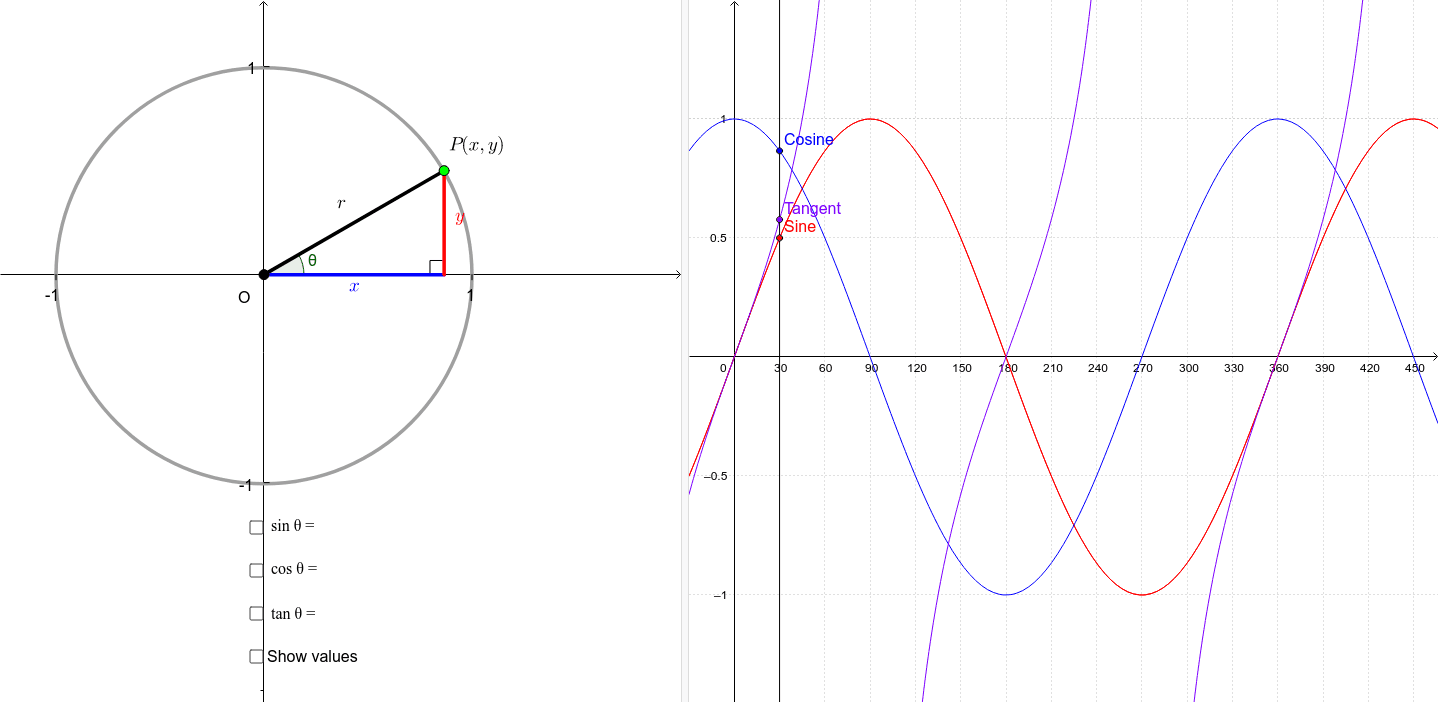
This example demonstrates the trigonometric ratios on a unit circle. By dynamically adjusting the angle, you can observe how the values of sine, cosine, and tangent change with the angle. Key mathematical concepts include trigonometric functions, unit circle, and angles. GeoGebra commands used include Sequence, Point, Angle, Circle, Segment, and Midpoint. Suitable for high school mathematics education and learning.
GeoGebra Commands & Parameters
Sequence(Rotate[(r, 0), k°, (0, 0)], k, 0, 360) → list1Point(list1) → PAngle((1, 0), (0, 0), P) → θCircle((0, -0.004807882852143508), r) → cSegment((0, 0), P) → aSegment((0, 0), (x(P), 0)) → bSegment(P, (x(P), 0)) → dMidpoint(b) → AMidpoint(d) → BMidpoint(a) → CSegment(E, E - (0, 0.025)) → iSegment(F, F - (0, 0.025)) → jSegment(G, G + (0.025, 0)) → kSegment(H, H + (0.025, 0)) → lAngle(P, (x(P), 0), (0, 0)) → αSequence(Rotate[(r, 0), k°, (0, 0)], k, 0, 360) → list1_1
AI Drawing Prompt Reference
Draw a unit circle and dynamically adjust an angle to observe the changes in sine, cosine, and tangent values. First, draw a unit circle, then place a point on the circle to represent the angle. Next, draw a line segment from the origin to this point, and a perpendicular line from the point to the x-axis. Finally, draw a line segment from the origin to the foot of the perpendicular, showing the sine, cosine, and tangent values of the angle.
The prompt above was compiled from the original drawing commands and is for reference only.