
Trigonometric Ratios Interactive Demonstration
Loading the math board and drawing, please wait…
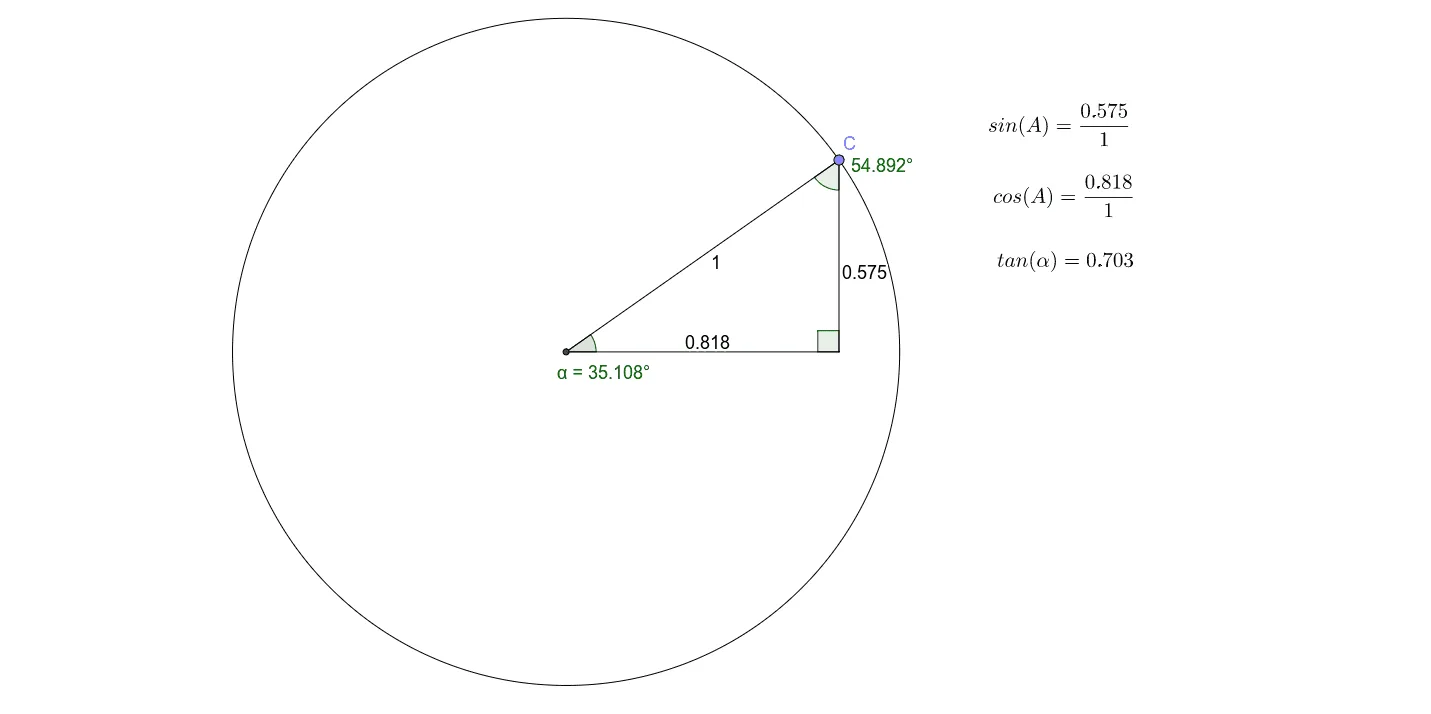
This GeoGebra example provides an interactive visual demonstration of trigonometric ratios (sine, cosine, tangent) in a right triangle. It illustrates how the ratios of sides relate to acute angles, reinforcing the fundamental definitions: opposite/hypotenuse, adjacent/hypotenuse, and opposite/adjacent. The construction uses GeoGebra commands such as Intersect, Point, Circle, Segment, OrthogonalLine, and Angle to build a right triangle with an auxiliary circle, displaying angles α, β, γ and side lengths a, b, c. Dynamic text objects (text1, text2, text3) update the ratio values in real time as the triangle is manipulated. This resource is ideal for middle school to high school students learning trigonometry, as well as for teachers demonstrating the concept in class or for self-paced exploration of how changing an angle affects the ratios.
GeoGebra Commands & Parameters
Intersect(xAxis, yAxis) → APoint(xAxis) → BCircle(A, B) → c_1Point(c_1) → CSegment(A, C) → cOrthogonalLine(C, xAxis) → b_1Intersect(b_1, xAxis) → DSegment(C, D) → bSegment(A, D) → aAngle(D, A, C) → αAngle(A, C, D) → βAngle(C, D, A) → γ