
Trigonometric Ratios and Their Values - Interactive Demo
Loading the math board and drawing, please wait…
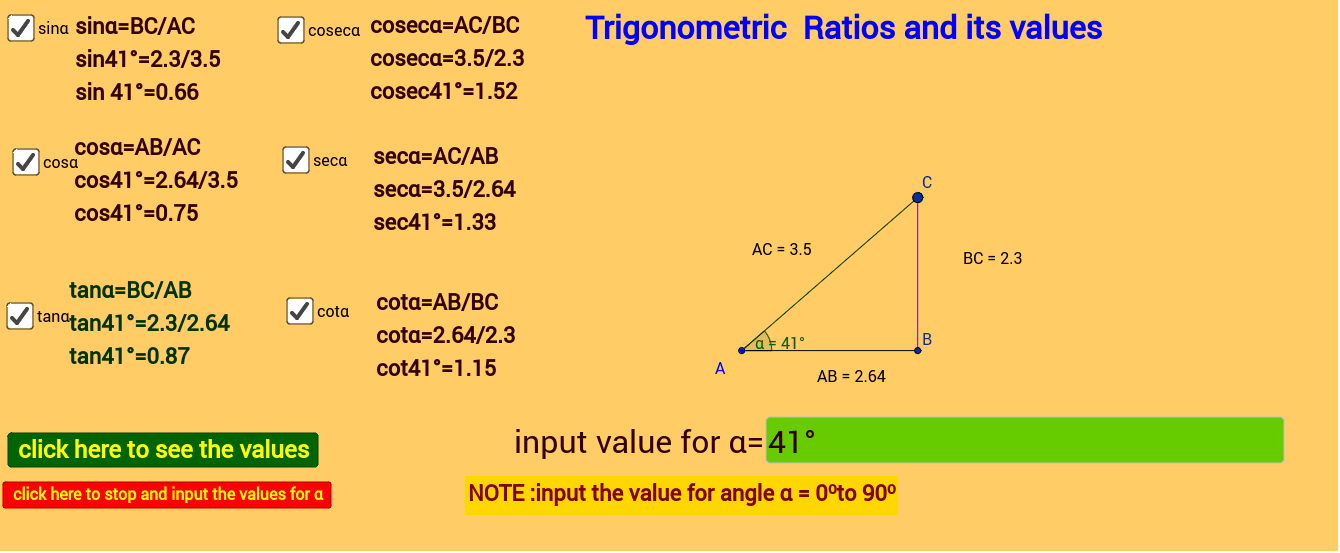
This GeoGebra example provides an interactive demonstration of trigonometric ratios (sine, cosine, tangent) and their numerical values in a right triangle. It visually shows how the ratios of side lengths change as the angle varies, reinforcing the fundamental definitions of trigonometric functions. The construction uses commands such as Intersect, Point, Segment, Rotate, Angle, OrthogonalLine, Distance, and Textfield to build the triangle, measure sides, and display dynamic values. Buttons (button1, button2) allow users to control the animation or step through angle changes, while text boxes and labels (text1 to text13) show the computed distances and ratios. This resource is suitable for middle school to high school students learning basic trigonometry, and can be used by teachers for classroom demonstrations or by students for self-exploration of angle-ratio relationships.
GeoGebra Commands & Parameters
Intersect(xAxis, yAxis) → APoint(xAxis) → B_1Segment(A, B_1) → fRotate(B_1, α_1, A) → CAngle(B_1, A, C) → αOrthogonalLine(C, f) → gIntersect(g, f) → BSegment(A, C) → hSegment(C, B) → iDistance(A, B) → distanceACDistance(B, C) → distanceCB'Distance(C, A) → distanceB'ATextfield(α_1) → InputBox1Distance(A, B) → aSegment(A, B) → j