
Trigonometric Function Construction
Loading the math board and drawing, please wait…
In collections
geometriadinamica.es
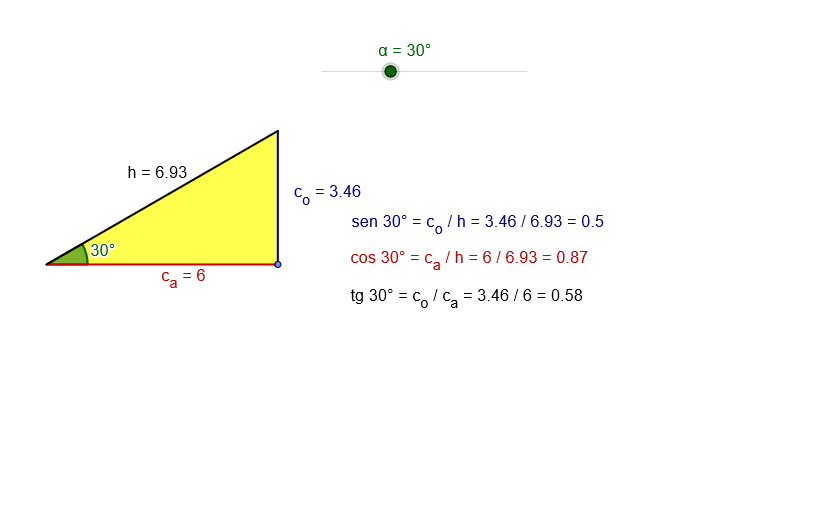
This example demonstrates how to draw trigonometric function graphs using geometric construction. Key mathematical concepts include trigonometric functions, angles, lines, and sets. Construction involves GeoGebra commands such as Intersect, Point, Ray, Rotate, OrthogonalLine, Polygon, and Angle. Suitable for high school students or math enthusiasts learning the integration of trigonometry and geometry.
GeoGebra Commands & Parameters
Intersect(xAxis, yAxis) → APoint(xAxis) → BRay(A, B) → aRotate(B, α, A) → CRay(A, C) → bPoint(a) → DOrthogonalLine(D, a) → cIntersect(c, b) → EPolygon(A, D, E) → P, c_a, c_o, hAngle(D, A, E) → β
AI Drawing Prompt Reference
Draw a triangle with one right angle, one acute angle and one obtuse angle. The graph includes a line (x-axis), a point (on the x-axis), a ray (from the line to the point), a rotated point (by rotating an angle), a ray (from the line to the rotated point), a point (on the ray), a perpendicular line (from the point to the ray), an intersection point (where the perpendicular line and the ray intersect), a polygon (formed by three points), and an angle (formed by three points).
The prompt above was compiled from the original drawing commands and is for reference only.