
Trig Ratios of Special Angles
Loading the math board and drawing, please wait…
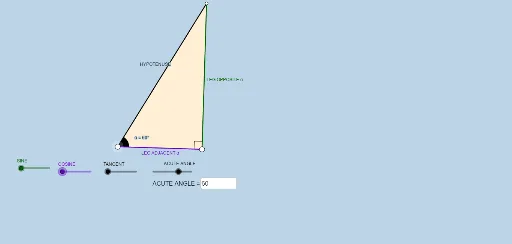
This example demonstrates how to construct and calculate trigonometric ratios for special angles (30°, 45°, 60°) using GeoGebra. It involves core concepts like trigonometric function definitions, properties of special angles, and geometric transformations. Key GeoGebra commands used include Segment, OrthogonalLine, Rotate, Angle, Ray, Circle, Intersect, Polygon, and Textfield to build right triangles and label sides and angles. Suitable for high school students to understand the geometric connection between trigonometric functions and special angles, as well as for geometric construction teaching.
GeoGebra Commands & Parameters
Segment(A, B) → fOrthogonalLine(B, f) → gRotate(B, (a * π / 180), A) → B'Angle(B, A, B') → αRay(A, B') → hCircle(B, 2) → cIntersect(c, g, 2) → CRay(B, C) → iIntersect(h, i) → DSegment(B, D) → jSegment(A, D) → kPolygon(A, B, D) → poly1, d, a_1, bRotate(B, If[0 < e ≤ 1, (-((e * (π / 2 - α)))), α - π / 2], D) → B'_1Rotate(D, If[0 < e ≤ 1, (-((e * (π / 2 - α)))), α - π / 2], D) → D'Segment(B'_1, D') → j'Rotate(A, If[0 < l ≤ 1, (α * l), α], A) → A'Rotate(B, If[0 < l ≤ 1, (α * l), α], A) → B'_2Segment(A', B'_2) → f'Rotate(B, If[0 < m ≤ 1, (m * π / 2), π / 2], B) → B'_3Rotate(D, If[0 < m ≤ 1, (m * π / 2), π / 2], B) → D'_1Segment(B'_3, D'_1) → j'_1Textfield(a) → InputBox1Angle(D, B, A) → β
AI Drawing Prompt Reference
Draw a right triangle with angles of 30°, 45°, and 60°, and display their corresponding cosine, sine, and tangent values. Start by constructing a right triangle, then draw a circle centered at one vertex that intersects the triangle's sides, forming new triangles. Rotate these triangles to demonstrate the trigonometric relationships for different angles and label the angles and side lengths.
The prompt above was compiled from the original drawing commands and is for reference only.