
Trig Ratios: Dynamic Right Triangle Side Ratios and Angles
Loading the math board and drawing, please wait…
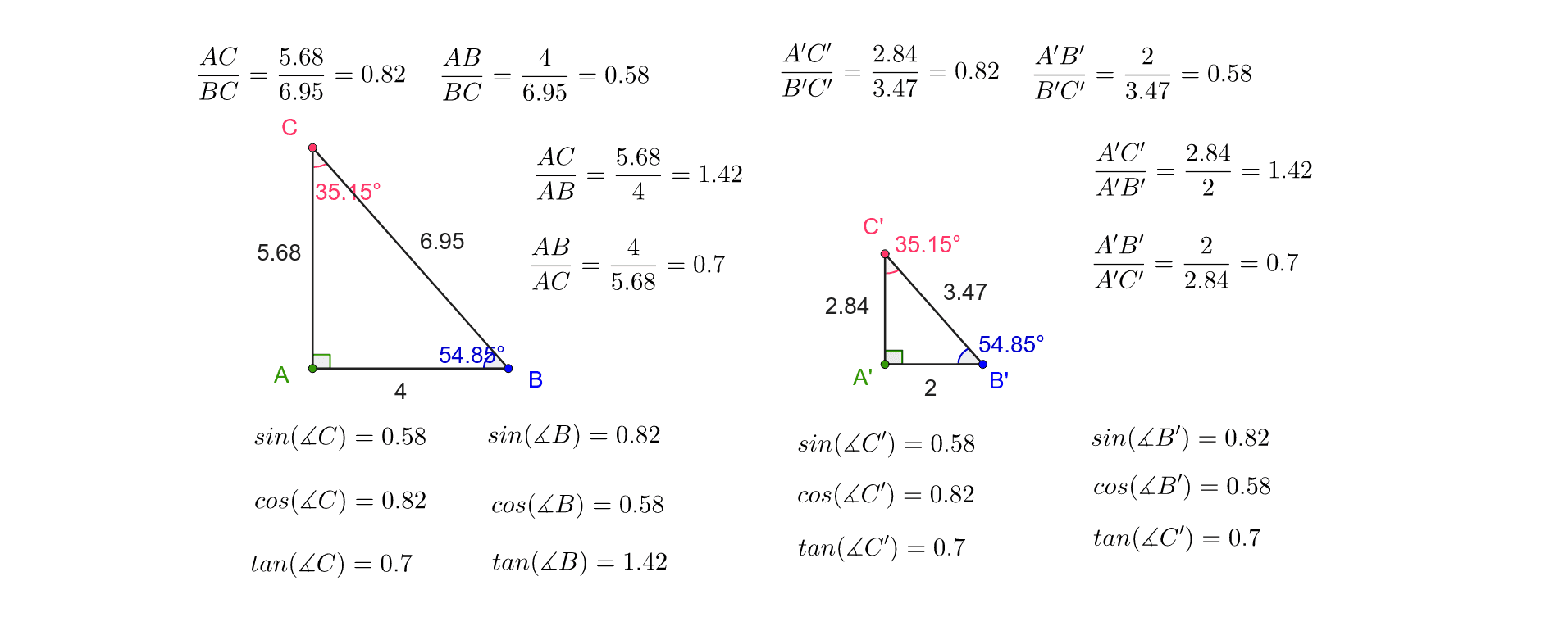
This GeoGebra example dynamically demonstrates the trigonometric ratios (sine, cosine, tangent) in a right triangle, showing how the ratios of side lengths change as the angle varies. It visualizes the fundamental definitions of trigonometric functions using similar triangles and angle-side relationships. The construction uses commands such as Line, OrthogonalLine, Point, Polygon, Dilate, Angle, and Distance to build the triangle, measure sides, and label angles. Text objects display real-time values of ratios like opposite/hypotenuse, adjacent/hypotenuse, and opposite/adjacent. Suitable for middle school or high school students learning introductory trigonometry, and useful for teachers to illustrate the connection between geometric ratios and trigonometric functions.
GeoGebra Commands & Parameters
Line(A, B) → fOrthogonalLine(A, f) → gPoint(g) → CPolygon(A, B, C) → poly1, AB, BC, ACDilate(A, 0.5, D) → A'Dilate(B, 0.5, D) → B'Dilate(C, 0.5, D) → C'Polygon(A', B', C') → poly1', A'B', B'C', A'C'Angle(poly1) → α, β, γAngle(poly1') → δ, ε, ζDistance(C', B') → C'B'