
Trig Ratios and Identities Demo
Loading the math board and drawing, please wait…
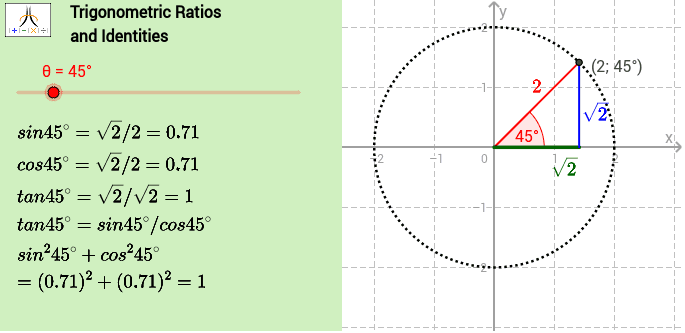
This example dynamically demonstrates trigonometric ratios and identities, visually showcasing their geometric meaning on the unit circle. It involves core concepts like trigonometric function definitions, circle properties, triangle geometry, secant lines, curve sketching, and binomial distribution. Construction highlights the use of GeoGebra commands/objects such as Vector, If, Intersect, Segment, Angle, Point, Circle, Length, Midpoint, Corner, and Polygon. Suitable for high school mathematics education to enhance understanding and application of trigonometric functions and identities.
GeoGebra Commands & Parameters
Vector(A_x, A) → vIf(surd, SurdText[yval], Text[yval]) → ytextIf(surd, SurdText[xval], Text[xval]) → xtextIntersect(xAxis, yAxis) → OSegment(O, A) → aSegment(O, A_x) → χSegment(A_x, A) → γAngle(xAxis, a) → βPoint(a) → CCircle(C, A) → cLength(a) → rMidpoint(a) → mpCorner(1, 1) → Cnr1Corner(1, 2) → Cnr2Corner(1, 3) → Cnr3Corner(1, 4) → Cnr4Polygon(CN1, CN2, CN3, CN4) → Panel, cn1, cn2, cn3, cn4
AI Drawing Prompt Reference
Draw a trigonometric function relationship diagram on the unit circle, including points A and A_x, line segments χ and γ, angle β, circle c, and a quadrilateral panel. First, create points A and A_x, then construct line segments χ and γ with points A and A_x, followed by constructing circle c with point A as the center and the distance from A to the origin as the radius. Next, construct line segment a from the origin to point A, calculate angle β, and finally connect the four corner points of the quadrilateral to form the panel.
The prompt above was compiled from the original drawing commands and is for reference only.